Something calls JSON.parse, directly or through res.json(), and the console says one of these:
SyntaxError: Unexpected end of JSON input
SyntaxError: Unexpected token '<', "<!DOCTYPE "... is not valid JSON
Almost everybody reads those as a complaint about their JSON and goes to look at the JSON. The JSON is almost never the problem. Usually there is no JSON at all, and the parser is telling you about the first thing it found that it could not use.
These are the messages Chrome prints. Firefox and Safari word theirs differently; the causes below are the same whichever browser the report came from.
What each message actually tells you
Run through a browser console, this is what you get:
JSON.parse("")                       // Unexpected end of JSON input
JSON.parse("   ")                    // Unexpected end of JSON input
JSON.parse("undefined")              // "undefined" is not valid JSON
JSON.parse("<html>")                 // Unexpected token '<', "<html>" is not valid JSON
JSON.parse('{"a":1,')                // Expected double-quoted property name in JSON
                                     //   at position 7 (line 1 column 8)
There is a diagnostic rule in that list which nothing states out loud, and it is the most useful thing on this page:
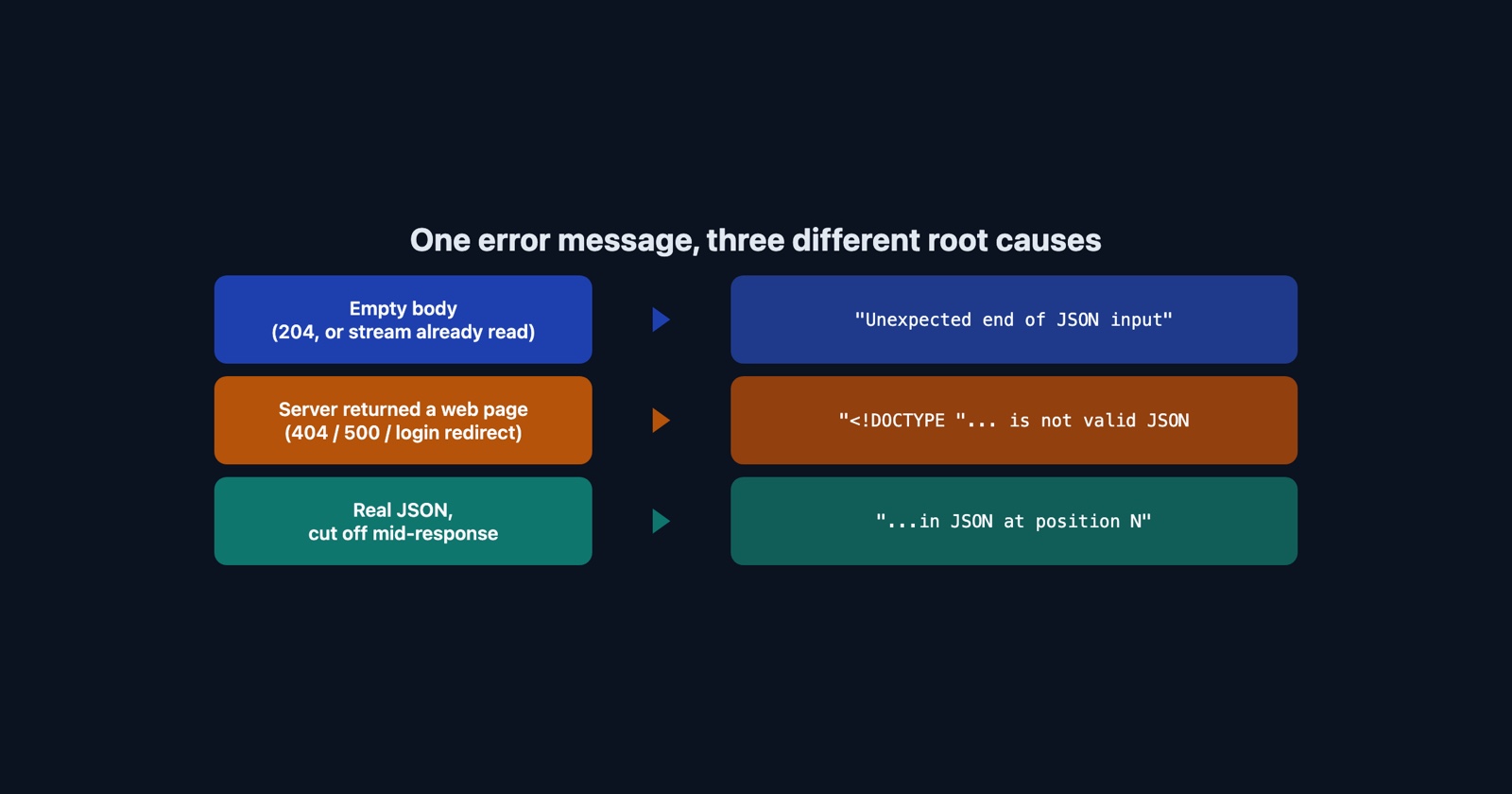
- A message with a position number means you really do have JSON, and it stops early or turns malformed partway through. Something truncated a real payload.
- A message quoting a snippet and ending “is not valid JSON” means it was never JSON. You were handed something else entirely.
- “Unexpected end of JSON input” means the parser reached the end before it had a complete value, which in practice means the body was empty. Whitespace counts as empty.
Those are three different bugs with three different fixes, and the error text is the only thing that separates them.
An empty body, and the four ways you get one
“Unexpected end of JSON input” is what JSON.parse("") produces, so the question is why the body
was empty.
A 204 No Content response is the honest version: the server is telling you there is nothing,
and calling .json() on it is the bug. A 200 with an empty body is the same situation
without the warning. A body already consumed does it too: Response bodies are streams and
can be read once, so await res.text() followed by await res.json() fails on the second call
with exactly this message. And an aborted request can leave you with a partial or empty body
depending on where it was cut.
A web page, which is the common one
The other message is the one you will actually meet, and it means your request returned HTML.
The reason it is so common is a detail of fetch that catches people once each: fetch does
not reject on 4xx or 5xx. A 404 is a perfectly successful fetch as far as the promise is
concerned. So if the URL is wrong, or the session expired and a proxy answered with a login page,
or a web application firewall served a challenge, or the server threw a 500 and your framework
rendered its own error page, res.json() is handed a document that starts <!DOCTYPE html> and
reports the <.
A login page is the nastiest of these, because it usually arrives as a 200. Nothing in the status code is wrong. The body is just a sign-in form.
The improvement that stops one character short of useful
These messages used to be worse. V8’s issue 6551, “JSON.parse errors can be user-friendly for
short strings”, was opened in 2017 and implemented in May 2022: before it,
Unexpected token N in JSON at position 0, and after it, "NaN" is not valid JSON. The new
form quotes what it was given, which is a real improvement and the reason the phrase “in JSON at
position 0” has largely disappeared from browsers while remaining in every search result about
it.
There is a length limit on that quotation, and measuring it is worth a minute because nothing documents it. Parse a string of twenty characters or fewer and the message quotes the whole thing. At twenty-one or more it quotes the first ten characters and appends an ellipsis.
Now count the characters in <!DOCTYPE . There are exactly ten.
So for the single most common cause of this error, the helpful new snippet is "<!DOCTYPE "...
every single time. A 404 page, a 500 page, a login redirect and a firewall challenge all produce
character-for-character the same message. Fetching a genuine 404 from our own site, a 3,407-byte
HTML document, produces precisely that and nothing more.
The message looks like it is quoting the server for you. For the case you are most likely to be in, it is quoting the one part of the response that every HTML page shares.
Which is why the fix is never in the parser
Check the response before you parse it, and say what you found when it is wrong:
const res = await fetch(url);

if (!res.ok) {
  throw new Error(`${res.status} ${res.statusText} from ${res.url}`);
}

const type = res.headers.get("content-type") || "";
if (!type.includes("application/json")) {
  throw new Error(`expected JSON, got ${type || "no content-type"} from ${res.url}`);
}

return res.json();
Both checks earn their place. The first exists because fetch does not throw on a bad status.
The second exists because a 200 can still be HTML, which is exactly what the login-page case
looks like, and because it turns an unreadable parser error into a sentence naming the status,
the type and the URL.
And the version of this that arrives in a ticket is worse
Everything above assumes you can see the response. The person reporting the bug cannot.
What arrives is “it says something about JSON”, or at best a photograph of a console line reading
is not valid JSON. That line does not carry the status code, the content type, the URL that was
fetched, or the body. All five causes above produce the same console text, and four of the five
are invisible without the response.
Which makes this one of the errors where the console alone is not enough and the network tab is the artefact that matters: the request, its status, its content type and the first few hundred bytes of what came back. Opening the network tab is a minute’s work for somebody who has done it before and a different afternoon for somebody who has not.
Worth separating from its neighbour, because people search for one while having the other:
TypeError: Failed to fetch
is the request never completing. This error is the request completing perfectly and returning the
wrong thing.
Session Replay
Free Chrome extension. One click on the page that is misbehaving captures the screenshot, the console and the network log, and hands you a link to paste into the ticket.
What to take from it
The message names JSON because JSON.parse is where your program stopped, not where it went
wrong. Read it as a statement about the response: empty, or not JSON, or truncated. Then go and
look at the response, because the parser has already told you everything it knows.