How to write a Jira bug report that gets fixed

A template you can paste into the description field, and a way to put the screen, the console and the browser details behind one link on the Evidence line.

Why the ticket comes back

Most reopened bugs are not hard. They are under-described.

A developer picking an issue off the board reads it cold. They were not there when it happened, they do not know which browser you had open, and the first thing they do is try to make it happen on their own machine.

When that fails, the issue does not get worked on - it gets a comment. Which version? What did the console say? Was that on staging or on production? Every one of those questions is a day, and none of them is about the bug.

The fix is not to write more. It is to write the same six things every time, and to attach what the browser already knew rather than retyping it from memory.

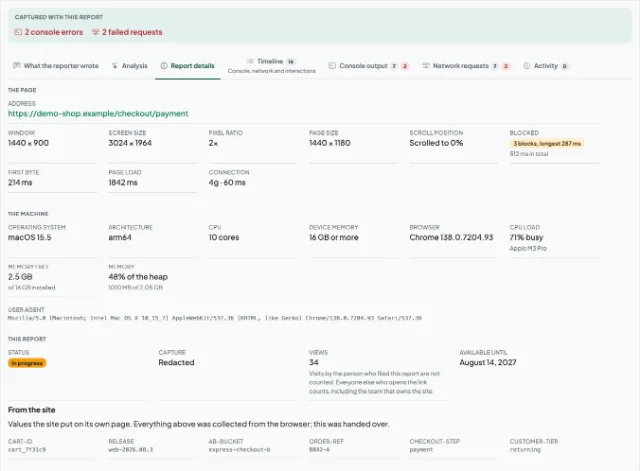
The page a link on the Evidence line opens: the reporter's note, the console output and the browser the bug was seen in

What a Jira bug report has to answer

Six fields, in the order a triager reads them.

Summary

One line, readable in a list of forty. What broke and where - "checkout total ignores the discount code", not "checkout bug".

Environment

Browser and version, operating system, window size, and which build or environment it was. The four questions a triage comment usually opens with.

Steps to reproduce

Numbered, from a state somebody else can reach. Start at the page, not at "then it happened" - the step you think is obvious is usually the one that matters.

Expected vs actual

Both, separately. "It does not work" is one half of a comparison, and the missing half is the only part nobody else can supply.

Evidence

The screenshot or recording, the console output and the network requests. One link beats three attachments nobody opens.

Severity and scope

How badly it hurts and who it hits. A blocker on one browser and a cosmetic gap everywhere are different tickets, and the board cannot tell them apart on its own.

A template you can paste in

Copy this into the description field and fill in the angle brackets. The order is deliberate: everything a triager needs to decide whether to pick the issue up sits above the fold.

Paste this into the Jira description field
Summary: <what broke, where, in five words>
Environment: <browser and version, OS, window size>
Steps to reproduce:
1. <first action>
2. <second action>
3. <the click that broke it>
Expected result: <what should have happened>
Actual result: <what happened instead>
Evidence: <link to the capture - screen, console, network>
Severity: <blocker / major / minor>
Affects: <build or environment>
The same template, filled in
Summary: Checkout total ignores the discount code
Environment: Chrome 139, macOS 15.5, window 1440x900
Steps to reproduce:
1. Add "Field Notebook" to the basket
2. Enter the code SPRING10 and apply it
3. Open the basket and read the total
Expected result: Total drops by 10% to 40.50
Actual result: Total stays at 45.00, no discount line
Evidence: https://session-replay.com/replays/8f3c1ab9d24e
Console: Uncaught TypeError: discount is null (cart.js:214)
Severity: major
Affects: staging, build 2026.08.14

Capture

Open the side panel on the page that is misbehaving and take a screenshot or record while you reproduce it. Nothing is captured until you press the button.

Annotate and upload

Draw on the screenshot to point at the thing that is wrong, add what you expected to happen, and upload. The browser details and the console output go with it.

Paste the link on the Evidence line

It opens for anyone who has it, with no account at either end, so whoever picks the issue up sees the page in the state you saw it in.

What this does not do

This page is a way of writing a ticket, not a plugin. So there is no confusion about what installing anything would get you:

  • No Jira integration, Jira app or Marketplace plugin. There is nothing to install on your Jira site.
  • Nothing here creates, updates or transitions an issue, and nothing reads your Jira project.
  • No syncing of statuses, comments or attachments in either direction.
  • A report is shared as a link, which you paste into the description yourself.
  • No always-on recording. Capture is deliberate: a person presses a button, and only then is anything recorded.

Questions people ask about Jira bug reports

A summary somebody can read in a list, the environment it happened in, numbered steps to reproduce, what you expected against what actually happened, the evidence, and how badly it hurts. The template on this page is those six fields in the order a triager reads them.

Jira takes file attachments, which works until the console output, the network log and the browser details are three more files nobody opens. The other route is to capture the page once, put the whole lot behind one link, and paste that link on the Evidence line - the reader gets the screenshot and the console together, in the state you saw them in.

No. There is no Jira app, no Marketplace plugin and no API connection: nothing here creates, updates or transitions an issue, and nothing reads your Jira project. What you get is a link you paste into the description yourself, which is why this page is a template rather than a setup guide.

They can produce the report - a capture needs no Jira account at either end, and the link opens for anyone who has it. Filing the issue still needs somebody with a seat, so the usual arrangement is that the reporter sends the link and whoever owns the board pastes it into a new issue.

Almost always because the environment or the steps were the parts left out. A report that names the browser and its version, the window size and the exact sequence of clicks either reproduces or narrows down to something specific; one that says "it breaks on the checkout page" can only be guessed at.

Stop retyping what the browser already knows

Capture the page once, and paste a link that answers the questions your next Jira comment would have asked.