QA testing tools that write the bug report for you
One click turns what a tester saw into something a developer can act on - screen, console output, network log and browser details, all attached.
The bug report is the slow part of testing
Finding the bug takes minutes. Writing it up takes longer.
A tester reproduces something, then spends the next ten minutes typing out what the browser already knows: which browser it was, which version, how big the window was, what the console said. Half of it gets left out, and the ticket comes back asking for it.
The round trip is the expensive part. A developer who cannot reproduce a report either guesses or asks, and either way the bug sits still for another day.
This is the step that can be automated without changing how your team tests. The tester presses one button, the context is collected around the capture, and what arrives is a link that already answers the follow-up questions.
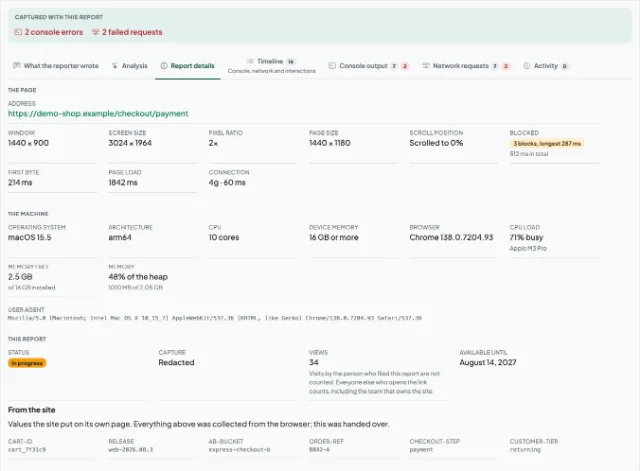
What a tester hands over
Collected around the capture, with nothing to fill in by hand.
Screenshot or video
Capture a still of the page, or record the tab or an area of the screen while you reproduce the problem.
Annotation before upload
Draw on the screenshot to point at the thing that is wrong. The marks are part of what the recipient opens.
Console output
Errors and warnings from the page, stack traces included, so a developer can start at the exception rather than at the description.
Network log and HAR
Every request made during a recording, with method, status and timing - and the whole lot downloadable as a HAR file for DevTools.
Environment
Browser and version, operating system, screen and window size. The four questions a triage comment usually opens with.
Interaction timeline
What was clicked and typed while the recording ran, lined up against the video, so the steps to reproduce are already written.
Three steps, tester to developer
Capture
Open the side panel on the page that is misbehaving and take a screenshot or start a recording. Nothing is captured until you press the button.
Annotate and upload
Mark up the screenshot, add the one thing only you know - what you expected to happen - and upload. The technical context goes with it.
Send the link
Paste it into whatever your team already uses. It opens for anyone who has it, with no account at either end, and stays available for 30 days.
What this does not do
A QA team runs on more than one tool, and this is only one of them. So that a comparison is a fair one:
- No test cases, test plans or test runs. Whatever you use to decide what to test, keep using it.
- No test automation. Nothing here runs a suite or drives a browser for you.
- No always-on session recording. Capture is deliberate: a person presses a button, and only then is anything recorded.
- No automatic filing into your tracker. A team can connect Jira and turn a report into an issue, but only when somebody presses the button on that report - nothing is filed on its own.
- No analytics or dashboards of user behaviour. A report is one bug, filed by one person.
Questions QA teams ask
Give your testers one button
Install it, reproduce the bug, and send a link that already answers the questions a developer would have asked.