A Loom alternative for showing a bug
Record the tab and send a link - with the console output, the network log and the browser details attached to the same page as the video.
A recording of a bug is half a bug report
The video shows what happened. It cannot show why.
Recording the screen is the obvious way to show somebody a problem, and for a walkthrough or a design review it is the whole job. For a bug it stops one step short: the person watching can see the button doing the wrong thing, and still has to ask which browser it was, how big the window was, and what the console said at that moment.
So the video gets sent, and then the thread starts. Which version? Can you open DevTools and paste the error? What did the request come back with? Each question is another day, and the answers were all on the machine where the recording was made.
This records the same way and collects that context around the capture. What arrives is one page: the video, and underneath it the console output, the requests the page made while it ran, and the browser it was recorded in.
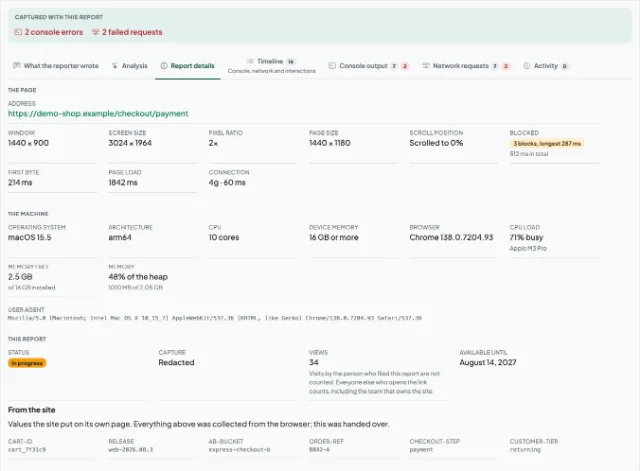
What the link carries besides the video
Collected while the recording runs, with nothing to fill in by hand.
The recording
Record the tab, or an area of the screen, from Chrome's own picker. Nothing is captured until you press the button.
Console output
Errors and warnings from the page, stack traces included, so the person watching can start at the exception rather than at the video.
Network log
Every request the page made while the recording ran, with method, status and timing - and the whole lot downloadable as a HAR file for DevTools.
Environment
Browser and version, operating system, screen and window size. The four questions a reply to a screen recording usually opens with.
Three steps, same as a screen recording
Record
Open the side panel on the page that is misbehaving and start recording. Chrome asks what to share - the tab, or an area of the screen.
Stop and upload
Add the one thing only you know - what you expected to happen - and upload. The console output, the requests and the browser details go with it.
Send the link
Paste it into whatever your team already uses. It opens for anyone who has it, with no account at either end.
What this does not do
This records a screen and hands you a link, which is where the comparison starts and also where it stops. So that it is a fair one:
- No webcam and no microphone. A recording is the tab or an area of the screen; sound comes along only when you are recording a tab and Chrome offers it.
- No editing, trimming or titles over the video. What you recorded is what gets uploaded.
- No viewer analytics, comments or reactions. You will not be told who opened the link or how far they watched.
- No library or workspace to file recordings in. A report is one link, and you keep it wherever you keep the ticket.
- Links do not last forever. Thirty days by default, ninety on Professional, and then the link expires.
- Recordings are short by design: five minutes by default, ten on Starter and thirty on Professional. The panel shows the ceiling beside the timer from the moment you start recording and finishes the recording itself when it arrives, keeping everything up to that point. This is for reproducing a bug, not for recording a meeting.
Loom is a trademark of its owner. We are not affiliated with, endorsed by or connected to it.
Questions people ask when they arrive from Loom
Send the recording and the answers together
Install it, reproduce the bug, and send one link that already answers what the reply would have asked.