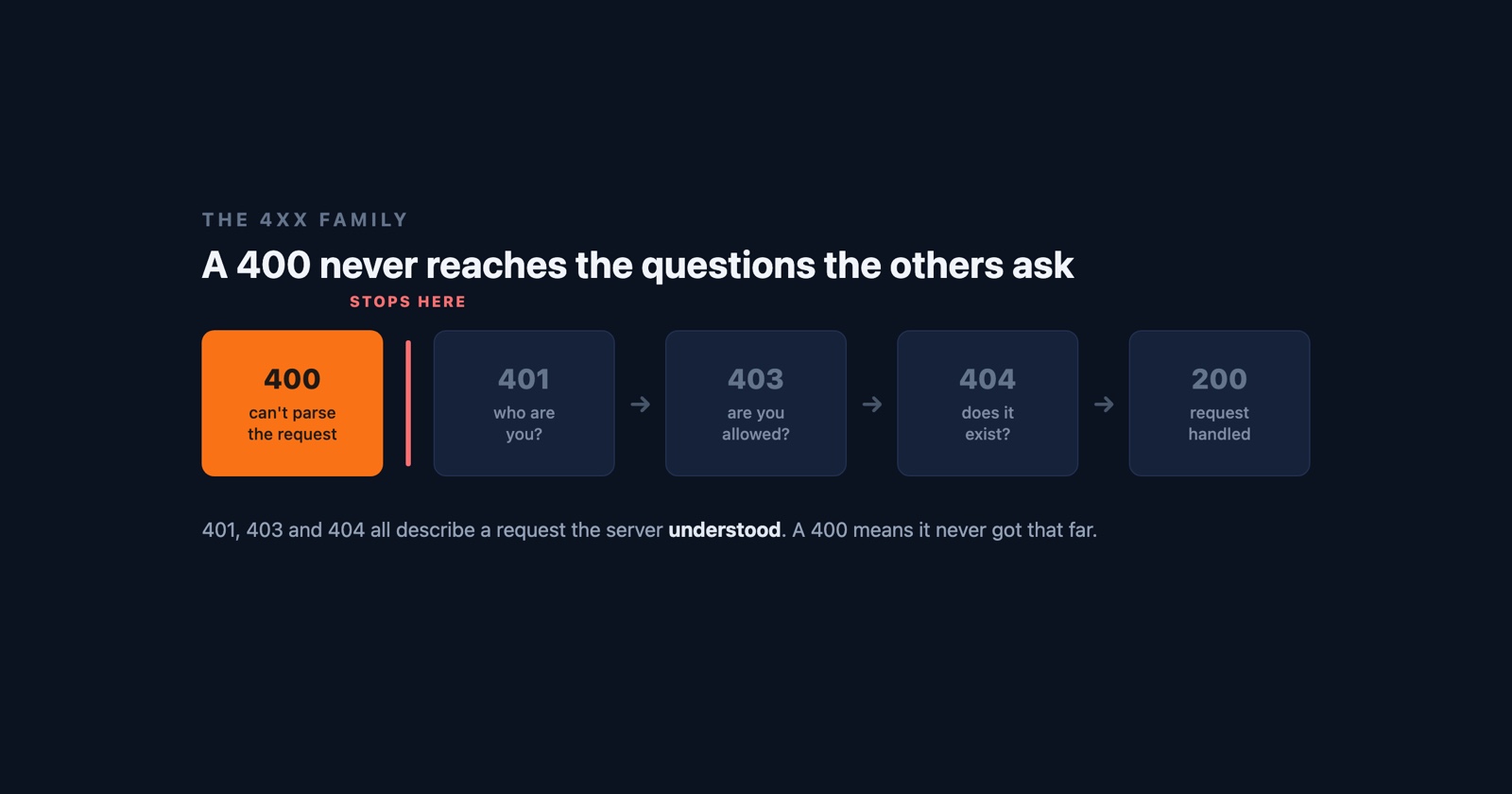
A 400 Bad Request is the server refusing to even try. It looked at what arrived, decided it was malformed enough that there was no point parsing further, and sent back the one code that means “this is not a request I can read.”
That is a different kind of refusal from most of the errors around it. A 404 means the server understood you perfectly and has nothing at that address. A 403 means it understood you and will not do it. A 400 means it never got as far as understanding: the syntax was wrong, a header was malformed, the body was not the shape the endpoint declared. The request failed before the question was ever asked.
The word “client” is doing a lot of work
Every reference will tell you a 4xx is a client error, and that is technically true and practically misleading. The client is not you. The client is whatever piece of software composed the request, and on a modern site that is almost always the page’s own JavaScript.
So a 400 on a site you are visiting usually means their front end built a request their back end would not accept. Somebody’s form serialiser sent a date in the wrong format, a fetch call posted JSON without saying it was JSON, a query string carried a character nobody escaped. The status code blames the client and the client is theirs.
This matters because it inverts the advice that comes with most errors. With a 500 the fault is obviously the server’s and there is nothing you can do. With a 400 the fault sounds like yours, which sends people through twenty minutes of clearing caches and retyping URLs for a bug they could not have caused.
The 4xx family, which get confused constantly
- 400 Bad Request
- The request was malformed. The server could not parse it well enough to act on it, so nothing about who you are or what you asked for was ever considered
- 401 Unauthorized
- The request was fine. You have not proved who you are, and the server wants credentials
- 403 Forbidden
- The request was fine and it knows who you are. You are not allowed this
- 404 Not Found
- The request was fine and there is nothing at that address
The line worth holding on to is that only the 400 is about the shape of the request. The other three all describe a well-formed request meeting a wall further in, which is why 401 and 403 get swapped for each other so often and neither is ever confused with a 400. If you are getting a 400, stop asking about permissions and start asking what was actually sent.
The one 400 you really can fix from your side
There is an exception, and it is common enough to be worth knowing before you write the site off as broken: a request whose headers are too large.
Cookies are headers. A site that has accumulated a few years of them, or a login flow that has been retried enough times to stack up session state, can push the header block past the limit the server is willing to read. Most servers answer that with a 400, sometimes with a page that says “Request Header Or Cookie Too Large” and often with nothing at all.
The tell is that it follows you around one site and no others, survives a reload, and clears instantly in a private window. If that describes what you are seeing, deleting that site’s cookies fixes it, and it is the only 400 where the usual folk remedies are the actual answer. If a private window shows the same 400, it is not this, and no amount of clearing will touch it.
If it is your site
The response the user got is nearly empty by design, so the cause is in what was sent rather than in what came back. A handful of things account for most of them.
A malformed or mistyped body. A POST carrying JSON that does not parse, or that parses and
does not match the schema the endpoint validates against. Often a field that is null where the
API declared a string, or a number arriving as "12" because a form serialiser stringifies
everything.
A missing or wrong Content-Type. A body the server would happily accept, sent without saying
what it is, or labelled text/plain when the parser wants application/json. The request is
well-formed to look at and unreadable to the thing that has to read it.
Something in the URL that was never escaped. A raw space, a stray % that is not the start of
an escape sequence, a query parameter carrying a URL of its own with its own & in it. Some of
these are rejected by the web server before your application ever sees them, which is why they
leave no trace in your application log.
Headers the proxy will not take. The cookie case above, but also an oversized Authorization
header or a header carrying a newline. These are usually refused at the edge, by nginx or a CDN,
and the 400 that comes back is that proxy’s, not yours.
That last group is the reason a 400 can be genuinely invisible from the inside. If the rejection happened before the request reached your code, there is no line in your application log to find, and you can spend an afternoon looking for a bug in a place it was never allowed to reach.
Why a 400 is hard to chase after the fact
A 400 is entirely a statement about a request that no longer exists. By the time somebody tells you about it, the malformed thing has gone: you have a status code, a rough time, and a URL that probably works fine when you type it yourself, because the thing that broke was in a header or a body you cannot see from the address bar.
Reproducing it means reconstructing the exact request, which means knowing what the page sent - and that is the one thing a screenshot of an error page cannot tell you.
Session Replay
Free Chrome extension. One click on the page that is misbehaving captures the screenshot, the console and the network log, and hands you a link to paste into the ticket.
The network log is the whole point here. It holds the request that got the 400 with its method, its headers and its body, which is exactly the material a 400 is a complaint about. Whoever picks the report up can read what was sent rather than guess at it, and that is usually the entire investigation.
In one paragraph
A 400 Bad Request means the server could not parse what arrived and gave up before considering it, which makes it the only 4xx that is about the shape of the request rather than about permission or existence. It is called a client error, but the client is usually the site’s own JavaScript, so as a visitor there is generally nothing to fix - with one real exception, a cookie or header block grown too large, which a private window will confirm in seconds. If it is your site, look at what was sent: an unparseable body, a missing content type, an unescaped URL, or a header your proxy refused before your code ever ran.