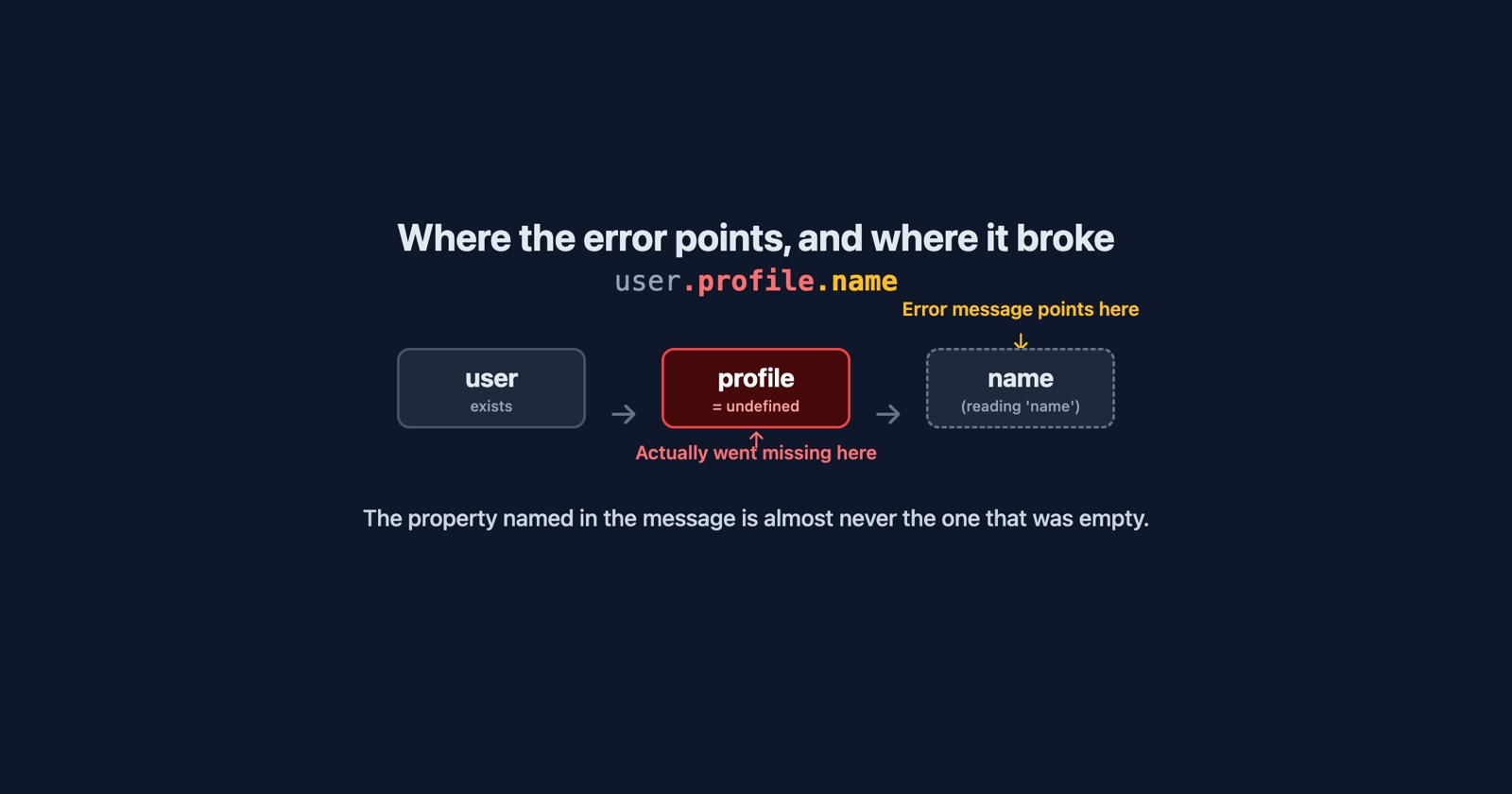
TypeError: Cannot read properties of undefined (reading 'name') is the most common line in a
browser console, and one of the most misread. Almost everyone who sees it looks for the thing
called name. The thing called name is fine. The error is about whatever was supposed to be
holding it.
That is the whole difficulty of this message in one sentence. It names the property you were trying to read, and says nothing about the variable that turned out to be empty. So the fix is never where the message points, and the first minute of every investigation is spent working out what the message is actually about.
Reading the message
Take the code user.profile.name. If user exists but has no profile, then user.profile is
undefined, and reading .name off undefined throws. The message says (reading 'name'). It
does not say profile is missing, and name is the one word in the expression that is not the
problem.
Different browsers phrase this differently, which matters when the same bug arrives from three people:
- Chrome and Edge:
Cannot read properties of undefined (reading 'name'). Older versions saidCannot read property 'name' of undefined, same meaning. - Firefox:
TypeError: user.profile is undefined, orcan't access property "name", user.profile is undefined. Firefox names the expression that was empty, which is more useful. - Safari:
TypeError: undefined is not an object (evaluating 'user.profile.name'). Safari gives you the whole expression and leaves you to work out which part failed.
Three wordings, one bug. A team that files bugs by pasting the console line will open three tickets, and the Firefox one is the only one that says where to look.
There is a sibling, Cannot read properties of null, and it is not quite the same error. null
is what you get from a lookup that ran and found nothing: document.querySelector('.total') on a
page with no .total element. undefined is what you get from something that was never set at
all: a property that does not exist on the object, a variable that was declared and not
assigned, a function that returned nothing. null usually points at the page; undefined
usually points at the data.
Where the undefined came from
The message is the same in every case. The cause is one of a short list, and the property name in the parentheses is a decent hint about which.
The data has not arrived yet. The page rendered before the request that fills it came back,
and the code read response.items.length while response was still the placeholder. This is the
one that appears on slow connections and not on fast ones, on a phone and not on a laptop, for
the customer and never for the developer. (reading 'length') and (reading 'map') are the
typical tells: something expected an array and got nothing.
The shape changed. The API used to return user.profile; now it returns user.profile only
for accounts that have filled one in, or it renamed the key, or the field moved one level up.
Nothing on the client changed, and the error started on the day of somebody else’s deploy. This is
the version that arrives as “it worked yesterday”.
The key is spelled differently. item.userId in the code, item.user_id in the response.
Nothing warns you: JavaScript reads a property that does not exist as undefined and carries on,
and the error only surfaces one step later when something tries to read through it.
It is an empty list. results[0].title when results is []. Perfectly valid code, until
the first search that matches nothing. Test data is rarely empty; production data often is.
Something returned nothing. A function with a code path that forgets to return, an
async function whose caller forgot to await it and got a promise instead of a value, a
.find() that found no match. All of these produce undefined and hand it to the next line.
The code is minified. In production the message reads Cannot read properties of undefined
(reading 'a'), because the property was renamed by the build. The line number points into one
enormous line. Without a source map, the message has stopped saying anything at all, and the
only thing left is the stack of requests and clicks that led up to it.
What it looks like from the other side
None of this is visible to the person who hit it. What they see is a section of the page that never filled in, a button that does nothing, a form that will not submit. Nothing on the page says “an error occurred”, because the error happened inside a script and the script simply stopped. The console line exists, in a panel they have never opened.
So the report says “the order page is blank”. And the developer reproduces it, with a fast connection, a complete account and a non-empty list, and it is not blank.
- Weak
- Order page is blank for one customer, cannot reproduce.
- Better
- Console: TypeError: Cannot read properties of undefined (reading 'items'), orders.js line 214. The request to /api/orders just before it returned 200 with an empty body. Customer has no orders yet.
The second version is a fix waiting to happen. Everything in it came from the page at the moment of the failure: the console line, the request before it, and the response that was supposed to hold the data. That is the evidence this error needs, and it is exactly the evidence a person looking at a blank page cannot supply on their own. Our guide to writing a bug report covers what to ask for; the short version is that for this error, the console and the network log are the report, and the description is a caption.
Session Replay
Free Chrome extension. One click on the page that is misbehaving captures the screenshot, the console and the network log, and hands you a link to paste into the ticket.
Finding the cause in the developer tools
When you have the page in front of you and the error reproduces, three moves settle it.
Pause on exceptions. In Chrome’s Sources panel, the pause icon with “Pause on uncaught
exceptions” stops the script on the line that threw, with every variable still in scope. Hover
the expression and you see which part of user.profile.name is undefined, which the message
would never have told you.
Look at the request before it. Switch to the Network tab and find the response that should
have filled the object. Nine times in ten the answer is there: an empty body, a 200 with an
error message inside it, a key with a different name, or a request that never fired because it
was waiting on something else. The failed to fetch
article covers the case where the request itself died; this article is about the case where it
succeeded and returned the wrong shape.
Check the order of events. If the error only appears sometimes, it is almost always the first cause above: a read that runs before the data is there. Throttle the network in the Network tab to “Slow 3G” and reload. If the error appears reliably, it is a race, and the fix is to wait for the data rather than to guard the read.
The fix that is not a fix
user?.profile?.name makes the error go away. It does not make the profile appear. Optional
chaining turns a crash into a silent undefined, which then flows into the page as an empty
string, a missing row, a button with no label, and the bug is now invisible to you and still
visible to the customer.
It is the right tool when the absence is legitimate: an account that genuinely has no profile
yet. It is the wrong tool when the absence is the bug. The question to ask before adding a ?.
is whether the value should ever be missing. If not, the crash was telling you something, and a
guard is a way of not listening.
What to take from it
The message names the property you asked for and hides the thing that was empty. Read it as “the step before this one produced nothing”, and go and look at that step: the request, the return value, the key name, the list that was empty. The fix is upstream of the line number, every time.
And when the report comes from someone else’s screen, the console line and the network log are not context for the bug. For this error, they are the bug.