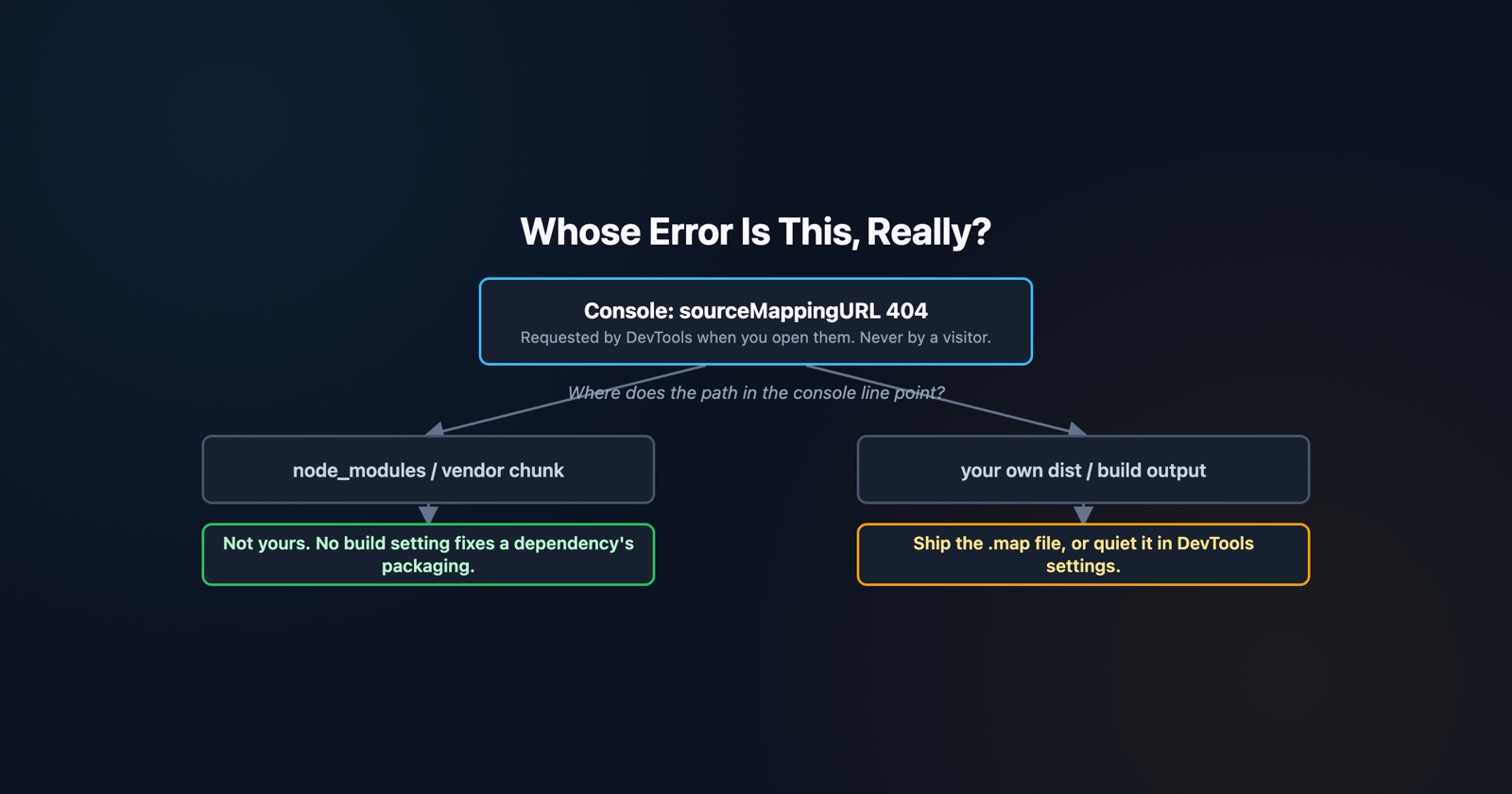
You open the console, and before anything of yours has run there are four red lines about source maps that could not be loaded. The instinct is to go and look at your build configuration, because the words name a thing your build produces.
That is usually the wrong place, and the reason is worth knowing, because it takes about ten seconds to tell whose problem it is and most people never learn the trick.
What is actually being requested
A minified file can carry a pointer to a map that translates it back to the source it was built from. There are two ways to attach one.
The common way is a comment at the end of the file, //# sourceMappingURL=bundle.js.map. The other
is an HTTP header, and MDN is specific about which wins: the SourceMap header “has precedence
over a source annotation (sourceMappingURL=path-to-map-js.map), and if both are present, the
header URL is used to resolve the source map file.” There is also an older X-SourceMap header,
which is deprecated.
What the map is for is equally specific. In MDN’s words, “Developer tools use the source map to reconstruct the original source from the optimized JavaScript returned in the response, allowing developers to debug the original code rather than the format that has been optimized for sending.”
Who makes the request, which is the first useful fact
Chrome’s own documentation answers this in one sentence: “When you open DevTools, it attempts to load source maps, if any.”
So the request is made by your developer tools, on your machine, because you opened them. A visitor with the console closed does not fetch these files and does not see these lines. Whatever this is costing you, it is not costing them.
That alone rules out most of the panic. A page is not broken because of it, nothing is slower for anybody, and no user-facing behaviour depends on it.
Why it is usually not yours
Here is the part that saves the afternoon.
The pointer lives inside the file that shipped. If that file came out of your own build, the
pointer is yours and so is the missing map. But a large share of these lines come from code you did
not write: a package that was published to npm with the sourceMappingURL comment left in and the
.map file left out, because the publisher excluded it from the package to keep the download
small.
Your bundler copied that comment along faithfully, because it is a comment in a file it was asked to include. There is nothing in your configuration that produced it and nothing there that can fix it.
So read the URL in the error before changing anything. If the path points at your own build
output, it is yours. If it points inside a vendor chunk, a node_modules path, or a CDN you do not
control, it is somebody else’s packaging decision and your options are to ignore it or to stop
loading it.
The three things that actually cause it
The map was never published. The commonest case, and the one above. Nothing to fix.
The map exists but the request does not get through. Chrome notes that source map requests “may be treated as cross-origin and might not get through”, which is the case worth knowing about because it looks identical in the console and is not a missing file at all. A map on a different origin with no permissive headers fails the same way as one that was never uploaded.
The map was deliberately not deployed. Plenty of teams build maps and keep them out of the public directory on purpose, so that the original source is not downloadable by anybody who opens developer tools. That is a defensible choice, and the console line is its cost.
Stop guessing and read the list
Chrome has a panel that answers this per file instead of leaving you to match console lines to bundles. Developer Resources shows a Status column, to see whether the load succeeded or failed, and an Error column with the message for each one. It also lets you load a map by hand, which is how you check that a map you kept private is otherwise correct.
That list is the difference between “the console is full of source map errors” and “three of these are from one dependency and one of them is ours”.
What to do, in order
If it belongs to a dependency: nothing. It is noise generated by your own tooling about somebody else’s packaging. No user is affected and no build change will remove it.
If it is yours and you want working maps, ship the .map file alongside the bundle, or keep it
private and upload it to your error tracker instead, which is where it earns the most and exposes
the least. A stack trace against minified
code is close to useless,
and this is the file that fixes that.
If you just want the console quiet, the setting is in DevTools rather than in your project: Settings, then Preferences, then Sources, where Chrome’s documentation points you to the JavaScript source maps checkbox. Turning it off stops the requests and the lines with them.
The cost nobody counts
A console with a dozen permanent warnings in it is not free, and the price is not performance.
It is that everybody learns to skim. When the console always has red in it, red stops being a signal, and the one line that matters arrives in the middle of eleven that do not. The error about an undefined property that explains the broken checkout is sitting four lines below a source map warning that has been there since March.
That matters more when somebody else is doing the looking. A screenshot of a console from a user, or a captured log attached to a bug report, arrives with all of this in it, and the person reading it has to know which lines are permanent furniture before they can see what is new.
Session Replay
Free Chrome extension. One click on the page that is misbehaving captures the screenshot, the console and the network log, and hands you a link to paste into the ticket.
Knowing which of those lines were always going to be there is most of what makes a captured console readable.
The short version
- The request is made by your developer tools when you open them, not by the page. No visitor sees this and nothing is slower for them.
- Read the URL in the message first. A
node_modulesor vendor path means it is a dependency’s packaging, and there is nothing in your build to change. - A cross-origin map fails in a way that looks exactly like a missing one.
- Developer Resources lists the status and the error per file, which beats reading console lines.
- The checkbox that silences it is a DevTools preference, not a project setting.
- The real cost is a console nobody reads carefully any more, including the person you sent it to.