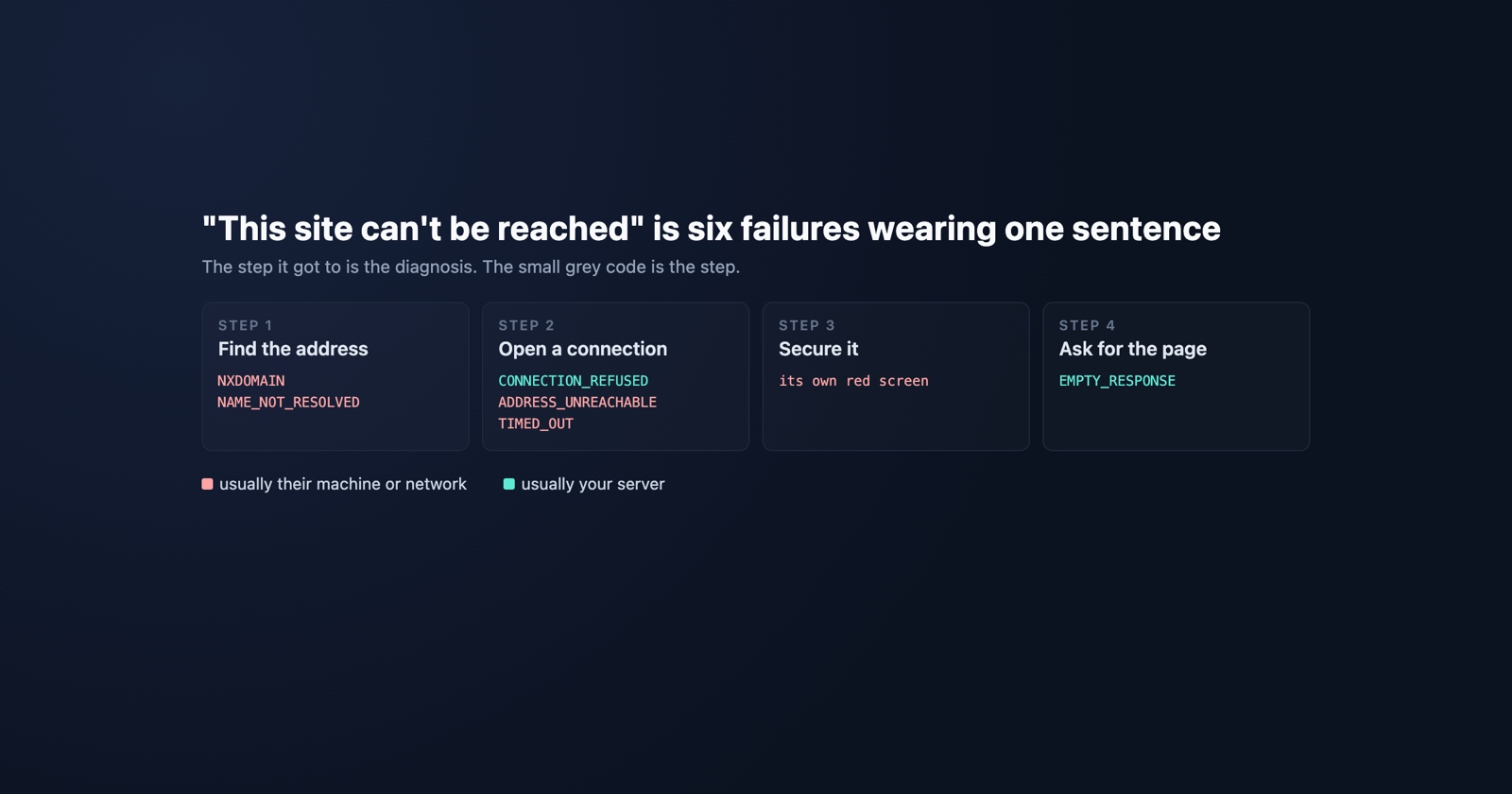
Chrome shows “This site can’t be reached” for at least six different failures, and they have almost nothing in common except the order they happen in. One means the name does not exist. One means the machine answered and hung up. One means your visitor’s wifi dropped.
The sentence is the same because it is the only honest thing the browser can say about a page it never received. What separates them is the small grey code underneath, and that code is the whole diagnosis.
The order things happen in
Loading a page runs through four steps, and each one has its own way of failing. Reading the codes in that order is what makes them make sense.
1. Find the address. The browser asks a resolver what IP the hostname points at.
2. Open a connection. It tries to reach that IP on that port.
3. Secure it. For HTTPS, it validates a certificate.
4. Ask for the page. It sends the request and waits for a response.
A failure at step one cannot be your server’s fault, because nothing has reached your server yet. A failure at step four almost certainly is. The code tells you which step you got to, and that is worth more than any amount of describing the symptom.
The codes, in that order
DNS_PROBE_FINISHED_NXDOMAIN and ERR_NAME_NOT_RESOLVED are step one. Chromium’s own
description of the second is “The host name could not be resolved.” The name does not exist as
far as the resolver that answered is concerned. Related, and more specific: ERR_NAME_RESOLUTION_FAILED,
“An error occurred when trying to do a name resolution (DNS)”, which is the lookup itself going
wrong rather than coming back empty.
A typo produces this. So does a DNS record that has not propagated, a domain that expired at the weekend, and a corporate or parental DNS filter refusing to answer for your domain. That last one matters more than it sounds: to the person affected, your site simply does not exist, and it works perfectly for you.
ERR_CONNECTION_REFUSED is step two, and it is the most informative failure on this list.
Something answered. A machine at that address actively said no, which means DNS worked, the
route worked, and a host is there with nothing listening on that port. Wrong port, a service
that died, a container that did not come back after a deploy.
ERR_CONNECTION_TIMED_OUT is step two failing silently: “A connection attempt timed out.”
Nothing said no, and nothing said yes. A firewall dropping packets rather than rejecting them
looks exactly like this, and so does a server too busy to accept.
ERR_ADDRESS_UNREACHABLE is routing: “The IP address is unreachable. This usually means
that there is no route to the specified host or network.” The packets have nowhere to go.
ERR_INTERNET_DISCONNECTED is “The Internet connection has been lost”, and it is the one
you can stop investigating immediately. It is the visitor’s own network, and no report built on
it tells you anything about your site.
ERR_EMPTY_RESPONSE is step four: “The server closed the connection without sending any
data.” This one usually is yours. Something accepted the connection and then went away without
answering: a process that crashed mid-request, a proxy that gave up, a worker killed for memory.
Certificate failures also live in step three, and they get their own screen rather than this one.
Which of the five you have is a separate question,
and the ERR_CONNECTION_* family has
its own article
with the refused-versus-reset distinction in detail.
- Weak
- Customer says the site is down. Looks fine from here. Asked them to clear their cache.
- Better
- DNS_PROBE_FINISHED_NXDOMAIN, only on their office network, works on mobile data. Their DNS filter, not our server. Confirmed the record resolves from three public resolvers.
Which half of the list is even yours
Sort them by who can fix them and the list splits almost evenly, which is the useful thing about it.
Usually theirs: the DNS failures when they are filtered or cached locally, the disconnected internet, the unreachable address, and a timeout caused by their network rather than your load.
Usually yours: connection refused, empty response, and a timeout when your servers are genuinely saturated.
Genuinely ambiguous, and worth checking first: a DNS failure that reproduces from a public resolver is your record, not their network. That check takes ten seconds and settles the largest category on the list. On any machine:
nslookup example.com 1.1.1.1
nslookup example.com 8.8.8.8
If both answer with your IP and the visitor still gets NXDOMAIN, the problem is between them and their resolver. If neither answers, it is your record, and the clock on that started whenever it last changed.
Session Replay
Free Chrome extension. One click on the page that is misbehaving captures the screenshot, the console and the network log, and hands you a link to paste into the ticket.
The reporting problem, which is the real one
Every code above appears on a page the browser generated. Your site never ran. There is no console, no network tab entry, no error your tracker can catch, and nothing for any in-page tool to record, including ours.
So this whole category reaches you only if a person tells you, and they will tell you badly, because there is nothing on screen to copy except a sentence and a code they have no reason to think matters. Most reports of this arrive as “your site is down” from somebody for whom it genuinely is.
Which makes the follow-up question unusually valuable, and unusually simple. Not “please reproduce with the console open”, which cannot be done here. Three things instead:
- The code, from the small grey text under the message, in full.
- Whether it happens on a different network, mobile data being the easiest test.
- Whether anybody else can reach it, which separates a global outage from one person’s resolver in one message.
Three answers and you usually know which of the four steps failed before you have looked at a server. Is it your bug or their outage covers the same reasoning for services that are up but degraded.
What to take from it
“This site can’t be reached” is a category, not a diagnosis, and the six failures inside it are split roughly evenly between things you can fix and things you cannot.
Read the code, work out which of the four steps it belongs to, and check DNS from a public resolver before believing anything else. And when you cannot reproduce it, remember that being unable to reach a site is the one failure where your own machine is the least useful instrument you own: yours resolves, connects, and works.
Chromium’s list of these errors, with the one-line definition of each, is net_error_list.h.