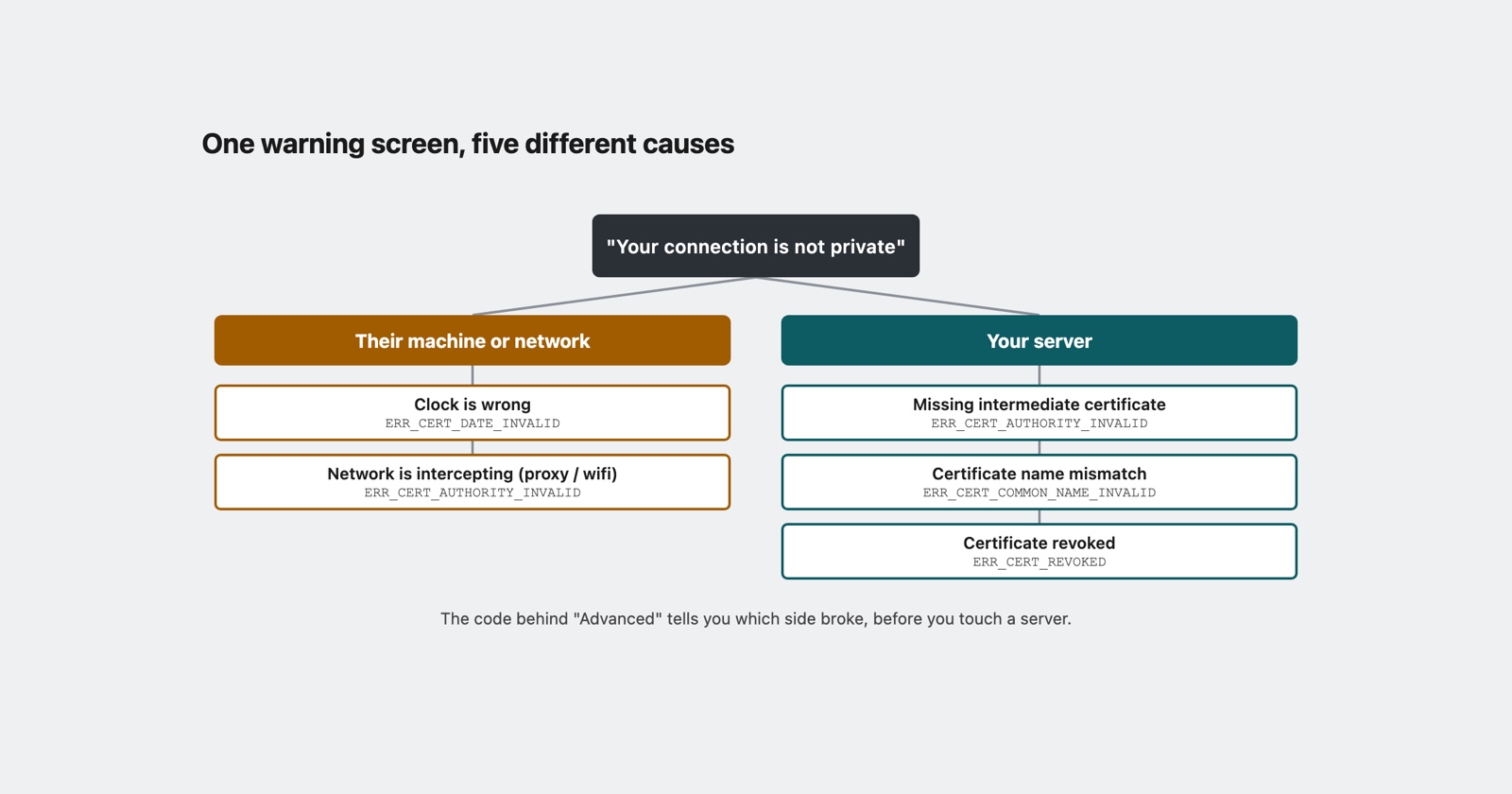
One red warning screen covers at least five unrelated failures. That is the whole difficulty with “Your connection is not private”: the page a user sees is identical whether your certificate expired last night, their laptop thinks it is 2019, or their employer is reading their traffic.
The screen hides the one thing that separates those, and it is behind the Advanced link:
a code beginning NET::ERR_CERT_. Everything useful is in that code, and almost no bug report
contains it.
What the browser is actually doing
Before any request goes out, the browser checks the certificate the server presented. Three of those checks fail often enough to have their own error codes, and Chromium’s own list of network errors describes each in one line.
ERR_CERT_COMMON_NAME_INVALID is, in Chromium’s words, “The server responded with a
certificate whose common name did not match the host name.” The certificate is real and valid,
for a different name. Somebody reached www.example.com when the certificate covers
example.com, or a bare IP address, or a staging host that was never added to the list of names.
ERR_CERT_DATE_INVALID is the interesting one, and the wording repays reading twice: “The
server responded with a certificate that, by our clock, appears to either not yet be valid or to
have expired.”
By our clock. The browser is comparing the certificate’s dates against the clock on the machine it is running on. A certificate that is perfectly valid will fail this check on a device whose clock is wrong, and a device whose clock is wrong is not a rare thing: a laptop back from months in a drawer, a phone that lost its time sync, a virtual machine resumed from a snapshot, a desktop where somebody set the date by hand. The same page loads for you and refuses for them, and nothing about the error says whose clock is at fault.
ERR_CERT_AUTHORITY_INVALID is “The server responded with a certificate that is signed by an
authority we don’t trust.” Three very different situations produce it, and they are worth telling
apart, which we do below.
ERR_CERT_REVOKED is “The server responded with a certificate has been revoked” (the
grammar is Chromium’s). Somebody withdrew it before its expiry, usually because a key leaked.
This one is genuinely yours and genuinely urgent.
The numbers are stable too, if you end up reading logs rather than screens: -200, -201, -202 and -206 respectively.
Three of the five are not your server
This is the part that turns a certificate error into a bug-report problem rather than an operations problem.
The clock. Covered above. Your certificate is fine. Their device disagrees about what day it is. You cannot reproduce this, you cannot fix it from your side, and no amount of redeploying will move it.
The network is reading their traffic. A corporate proxy, some antivirus products, and most
public-wifi captive portals work by presenting their own certificate for every site and signing
it with a root they install on the machine. When that works, the user sees nothing. When the root
is not installed, or the device is not a company one, every site on that network shows
ERR_CERT_AUTHORITY_INVALID. The tell is that it follows the network rather than the site: the
same person on mobile data is fine.
The missing intermediate. A certificate is trusted through a chain: yours is signed by an
intermediate, which is signed by a root the browser already trusts. Your server is supposed to
send the intermediate along with its own certificate. If it does not, some visitors are fine
anyway, because their browser has that intermediate from somewhere else or fetches it on the
spot, and other visitors get ERR_CERT_AUTHORITY_INVALID.
That last one deserves its own sentence, because it is the most misdiagnosed configuration problem on the web: a chain missing its intermediate works on the machine of the person who set it up, and fails for a fraction of strangers. It is genuinely your server’s fault, and your own browser is the worst possible instrument for finding it.
- Weak
- A customer says the site is insecure. Checked in Chrome and Safari here, padlock is fine. Told them to clear their cache.
- Better
- NET::ERR_CERT_AUTHORITY_INVALID, on their office wifi only, works on mobile data. Same page fine here. Proxy or missing intermediate, checked the chain from outside before blaming their network.
Telling them apart in a minute
The code narrows it to one of three causes. Three questions finish the job.
What time does their device think it is? Ask for the clock, not the date. Minutes matter for
some things; for this, being a year out is the common case and it is obvious once you look. If
the clock is wrong, ERR_CERT_DATE_INVALID is explained and nothing else needs investigating.
A device clock quietly wrong by months is also why “it broke around three” can send you to the
wrong hour of your logs, so it is worth knowing about for more than this one error. The
bug report guide puts the environment
in the template for the same reason.
Does it follow the network or the site? One question: does it happen on mobile data? A certificate problem that disappears when the user leaves the wifi is the network presenting its own certificate, and the fix is on their side or their IT department’s.
Does it happen for anyone outside your office? Check the chain from a machine that has never visited your site, which is what an external SSL checker is: it connects fresh and reports what your server actually sent, rather than what your browser has learned to fill in. If it reports a missing intermediate, that is your deploy, and it has probably been broken for a subset of visitors since the last certificate renewal.
The renewal that half-worked
Worth knowing as a shape, because it produces the most confusing version of this.
Certificates get renewed automatically now, and a renewal that installs the new certificate but not the new intermediate, or that reloads one process and not another, leaves a server that is correct from some angles and wrong from others. Users behind a load balancer hit the fixed node or the stale one at random. Half the reports say it is broken, half say it is fine, both halves are telling the truth, and an hour goes into looking for a pattern in the users when the pattern is in the servers.
The way out is to stop testing from a browser that may be helping you. Test the endpoint, from outside, repeatedly.
Session Replay
Free Chrome extension. One click on the page that is misbehaving captures the screenshot, the console and the network log, and hands you a link to paste into the ticket.
What a reporter can actually send you
Here is the honest limit, and it applies to us as much as anyone. A certificate warning means the page never loaded. There is no console, no network log, and nothing for a capture tool to record, because the browser refused before your site got to run. Whatever you normally rely on to see a failure through someone else’s eyes is not available for this one.
So it comes back to asking, and to asking for the right three things:
-
The code, from behind Advanced, in full.
NET::ERR_CERT_AUTHORITY_INVALID, not “a security warning”. - The date and time on their device, read off their own clock.
- The network, and whether mobile data behaves differently.
Three answers, and the cause is usually settled before anybody has looked at a server. That is a better hit rate than most errors offer, and it is available only because the browser did the diagnosis already and put it behind a link nobody clicks.
One thing not to tell them: click through the warning. It is the reflex, the button is right there, and on a real interception it hands the traffic to whoever is intercepting it. If the cause is the clock, fixing the clock takes the same thirty seconds and leaves the check working for the next site.
What to take from it
The red screen is a category, not a diagnosis. The code under Advanced is the diagnosis, and it comes free with every occurrence.
Three of the causes live on the user’s machine or their network, so reproducing them on yours is impossible by construction, and the one that is genuinely yours, the missing intermediate, is the one your own browser is least likely to show you. Both halves of that push the same way: for certificate errors, ask for the code and test from outside, in that order.
Chromium’s own list of these errors, with the one-line definition of each, is net_error_list.h. It is the source the error pages are generated from, and it settles arguments faster than any article can.