Chromium’s own description of this one is admirably flat: “Attempting to load an URL resulted in too many redirects.” The browser followed a chain of redirects, the chain did not end, and at some point it stopped following.
The number it stops at comes from the Fetch Standard, which is unambiguous about it: if request’s redirect count is 20, then return a network error. So twenty hops, and then the page you see is the browser’s, not yours.
What makes this error worth its own article is not the mechanism, which is obvious. It is that a redirect loop is almost never one thing being broken. It is two things, each behaving exactly as configured, disagreeing about something neither of them can see.
The classic, which is a disagreement about HTTPS
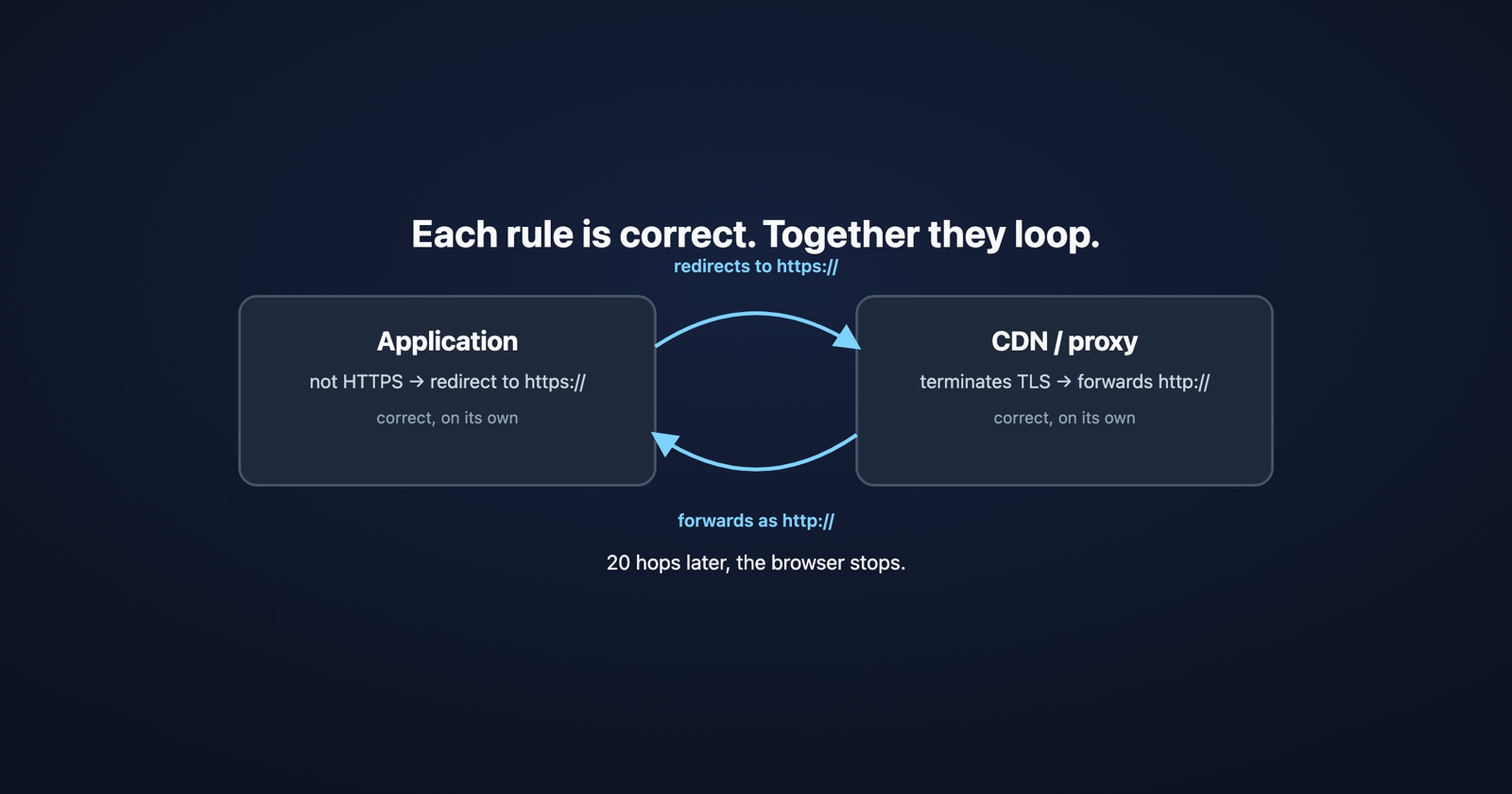
You put a CDN or a load balancer in front of your application. It terminates TLS, which is its job, and forwards the request to your origin over plain HTTP, which is normal and usually deliberate.
Your application has a rule that says: if this request is not HTTPS, redirect it to HTTPS. Also correct, and on a server with no proxy in front of it, exactly right.
Now put them together. The browser asks for https://example.com. The CDN terminates the TLS and
forwards http://example.com to your app. Your app sees plain HTTP, does the sensible thing, and
answers “redirect to https://example.com”. The browser obeys. The CDN terminates TLS and
forwards HTTP. Twenty times, and then the browser gives up.
Neither component is misconfigured on its own. The application is enforcing HTTPS. The proxy is terminating TLS. The bug lives in the gap between them, which is why both teams can look at their own configuration and correctly conclude it is fine.
The fix is that the app has to stop asking the wrong question. Instead of “was this request
HTTPS”, it needs to ask “was the original request HTTPS”, which is what the X-Forwarded-Proto
header exists to tell it. Most frameworks have a setting for trusting that header from a known
proxy, and it is usually off by default for good reason: a header anyone can set is not evidence
unless you know who set it.
The same shape, three more times
Once you see the pattern, the other common loops are the same story with different nouns.
www against the apex. One layer redirects example.com to www.example.com. Another,
added later or by someone else, redirects www back to the apex. Each rule is defensible. The
pair is a loop.
The trailing slash. Your web server redirects /about to /about/. Your framework’s router
redirects /about/ to /about. Both are enforcing a canonical form. They disagree about which
one is canonical.
The login loop, which is the one that reaches real users. The app sees no valid session, so it
redirects to /login. The login page checks the session cookie, believes it is signed in, and
redirects to the app. Round and round.
That last one is worth dwelling on, because the cause is usually the cookie failing to stick
rather than the redirect rules being wrong: a Secure cookie on a page served over HTTP, a
SameSite=None cookie without Secure, a cookie set on www.example.com being read on
example.com, or a browser configured to refuse third-party cookies in an embedded context. The
redirect logic is correct throughout. It is acting on a session that never persisted.
- Weak
- "Your login page is stuck in a loop. It just keeps reloading."
- Better
- ERR_TOO_MANY_REDIRECTS on /login, only in a private window, only after I sign out and back in. Works in my normal window. Chain is /app → /login → /app.
Why this one is unusually hard to see from the inside
A redirect loop is often specific to a state you are not in.
If it is the login loop, your cookie is already set and working, so the site behaves perfectly for you and loops for anybody arriving fresh. If it is a www rule someone added last week, it loops only for people who typed the other hostname. If it depends on a cookie the browser is refusing, it reproduces in a private window and nowhere else.
And the obvious check misses it. curl -I https://example.com shows you one response, which will
be a perfectly reasonable looking 301 with a Location header. Nothing about it says the chain
never terminates. What you want is to follow the whole thing:
curl -sIL -o /dev/null -w '%{url_effective} %{http_code}\n' https://example.com
curl -sI https://example.com | grep -i '^location'
Or open the Network tab with
Preserve log ticked, which is the only way it keeps the earlier hops instead of wiping them on
each navigation. The chain is the diagnosis: read the Location header at every step and you can
usually see the two rules arguing within three hops.
Session Replay
Free Chrome extension. One click on the page that is misbehaving captures the screenshot, the console and the network log, and hands you a link to paste into the ticket.
One thing about 301 worth knowing before you use it
A 301 is not simply a 302 that means it more.
MDN is specific about one consequence that surprises people: in the Fetch Standard, a user agent
receiving a 301 in response to a POST uses GET for the redirected request. Your form
submission becomes a GET, the body is gone, and the failure looks nothing like a redirect problem.
If you need the method preserved, 308 is the one that prohibits changing it.
The general rule is duller and more useful: reach for 302 or 307 while you are still working
out what the canonical URL is, and use 301 or 308 when you are certain. A permanent redirect
is a claim, and claims are much easier to make than to withdraw.
What to take from it
ERR_TOO_MANY_REDIRECTS means twenty hops without an ending, and the ending is missing because
two rules disagree, not because one is broken.
So do not start by looking for the broken rule. Start by listing every layer that is allowed to
issue a redirect: the CDN, the load balancer, the web server, the framework, the application, and
whatever a plugin added without telling anyone. Then read the chain, one Location header at a
time, and find the two that are arguing.
And when it does not reproduce for you, that is information rather than an obstacle. It means the loop depends on a state you are already past, and the fastest way to it is a private window, a different hostname, or the full picture of what the browser actually received from somebody for whom it is failing right now.