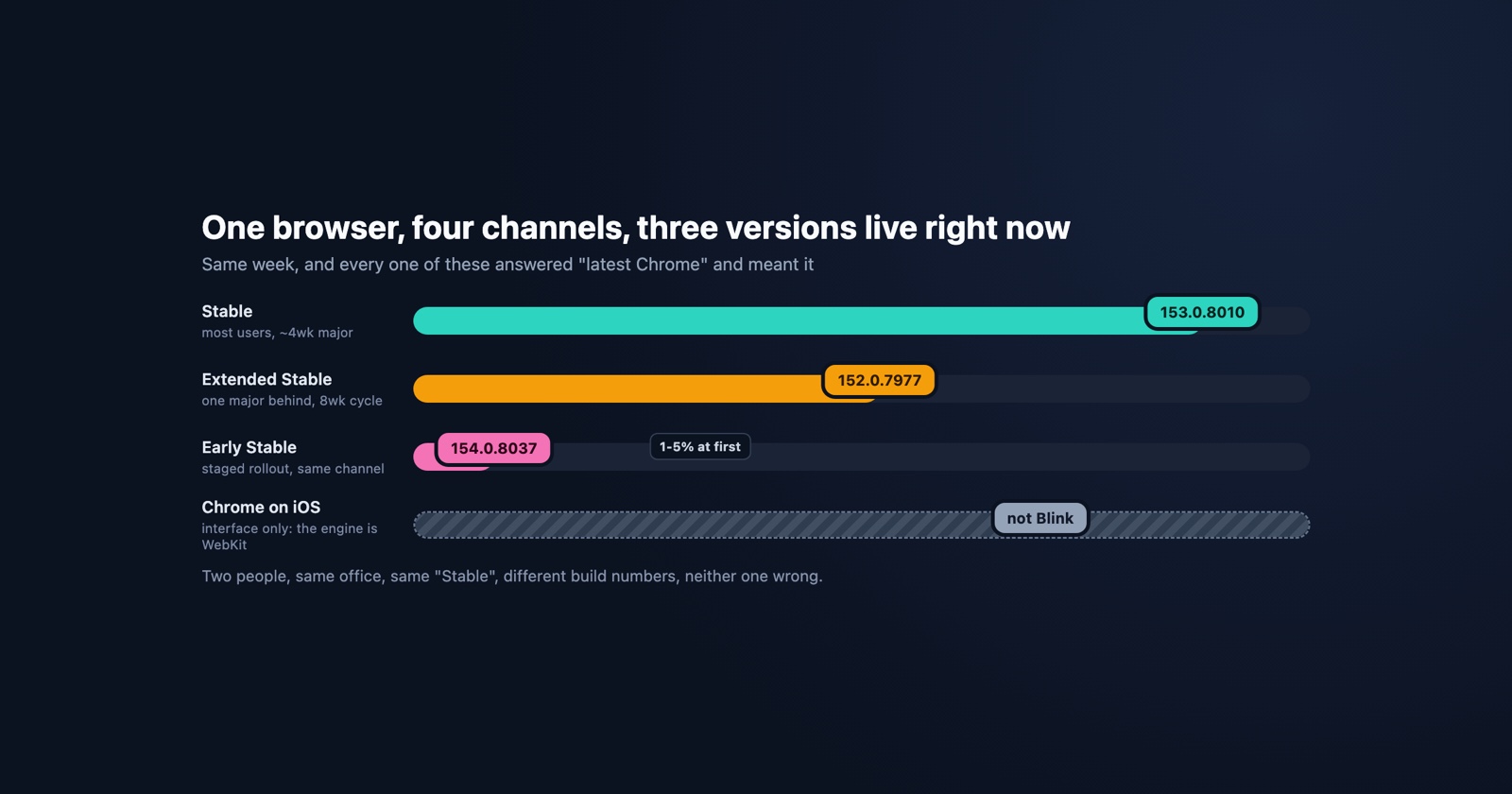
In the week of 14 September 2026, Chrome’s own release blog announced all of the following as shipping to real users:
- 152.0.7977.130 to Extended Stable, for Windows and Mac
- 153.0.8010.47/.48 to Stable desktop, with 42 security fixes in it
- 154.0.8037.44/.45 to Windows, described as “part of our early stable release to a small percentage of users”
- 154.0.8037.49 to Android, “to a small percentage of users”
- 154.0.8037.41 to Chrome on iOS, as the ordinary stable release there
Three major versions, in one week, all of them current, none of them wrong. Anybody on any of those would answer “what browser are you using?” with “the latest Chrome”, and every one of them would be telling the truth.
This is why “Chrome, latest version” at the top of a bug report is not information. It is worth ten minutes to understand what it is hiding, because the shape of it explains a whole category of bugs that happen to some people and not others.
The channels, as Google defines them
Chrome does not have a version. It has channels, each holding a different major version at any moment. From Google’s own documentation for administrators:
- Stable “has been fully tested by the Chrome test team and should be used by most of your users”. It updates “every 2-3 weeks for minor releases, and every 4 weeks for major releases”.
- Extended Stable users “get feature updates less frequently, but still receive security fixes”, and it is “updated every 8 weeks”. In practice it sits one major version behind Stable for most of the cycle, which is the 152-against-153 gap above.
- Beta is “a 4-6 week preview of what’s coming to the Stable version of Chrome”.
- Dev is “a 9-12 week preview”, and Canary is “a future version of Chrome that’s still in development”.
Beta, Dev and Canary are opt-in, and a person who chose one usually knows they did. Stable and Extended Stable are the two that matter for bug reports, because nobody on either of them chose anything: Extended Stable is set by an administrator, for the whole company, often years ago, and the people using it have no idea.
Staged rollouts, which is the part that surprises people
A channel is not a version either, because a release does not reach everyone on the channel at once. Chrome’s developer documentation is blunt about it:
Chrome uses staged rollouts for each channel, instead of releasing a new version to all users at once, hoping for the best. This means that initially, only a small number of users for each release channel get an update. This can start with just 1-5% of users, gradually building up to 100%.
So on any given Wednesday, two people on Stable Chrome, on the same operating system, in the same office, can be on different major versions, and neither of them did anything to cause it. “Early Stable” is that first slice with a name: the 154 release above went to Windows users before 153 had finished rolling out to everyone else.
The practical consequence is a bug that appears for a few per cent of your users and nobody else, starting on a day you did not deploy. That is indistinguishable, from inside your logs, from a bug you caused, and the first place most teams look is their own last release.
- Weak
- Two users report the datepicker is broken. We did not deploy yesterday. Must be data.
- Better
- Two reports, both Chrome 154.0.8037.44 on Windows, which went out as Early Stable yesterday to a small percentage. Everyone else is on 153.0.8010.47 and fine.
The mobile ones are not the same browser at all
Chrome on Android is Chrome: Blink, V8, the same engine as the desktop, on its own release track (153 on 15 September, 154 to a small percentage on the 16th).
Chrome on iOS is not. Apple’s App Store rules require browsers to use the system web engine, so Chrome on an iPhone is WebKit wearing Chrome’s interface. That release above, 154 on iOS, is a new version of the interface around an engine that changes when iOS changes, not when Chrome does. A CSS bug reported from “Chrome on my iPhone” is a Safari bug, and reproducing it in Chrome on your desktop reproduces a different browser. We wrote about what that does to reports when Safari 27 shipped.
Getting the actual version out of a report
There are three ways, in descending order of how likely you are to get an answer.
Ask for chrome://version. Typed into the address bar, it gives the full build on the first
line, plus the operating system and the command line. It is one copy and paste, it works on
Android, and it is unambiguous. This is the right thing to ask a developer or a technical
customer.
Read the user agent. Something on your side is already receiving it with every request, so
there is nothing to ask for. The limitation worth knowing is that Chrome reduced the string
some years ago: the minor, build and patch components are sent as zeros, so what you get is
Chrome/153.0.0.0 and not the build that actually shipped. The full build is available, but
only if you go and ask for it: Sec-CH-UA-Full-Version-List is a high-entropy client hint,
which a server receives only after requesting it with an Accept-CH header, or which a page can
read through navigator.userAgentData.getHighEntropyValues(). Neither the reduced string nor the
hint says anything about the channel, because Extended Stable 152 and Stable 152 are the same
version by different routes.
Ask the person. Which returns “the latest”, for all the reasons above. Not their fault: the version is three clicks deep in a menu and means nothing to them when they find it.
The pattern across those three is that the reliable answers do not come from asking. They come from something on the page reading the browser at the moment the failure happened, which is the argument for having the report capture its own environment rather than interviewing the person who filed it. Our own bug report guide puts the browser build in the template for this reason, and the honest reading of that is that the template is a fallback for when nothing captured it automatically.
Session Replay
Free Chrome extension. One click on the page that is misbehaving captures the screenshot, the console and the network log, and hands you a link to paste into the ticket.
What this means for testing
Two working conclusions come out of the above, and they pull in opposite directions from the usual advice.
Testing “the latest Chrome” tests one of at least three live versions. If your customers include a company of any size, some of them are on Extended Stable, one major version behind, for eight weeks at a time. A feature that relies on something shipped in the current major is broken for those users on purpose, and your test matrix says green. The cross-browser testing article argues for thinking in engines rather than browsers; the version axis is the same argument one level down.
A staged rollout is a suspect, and it is cheap to check. When reports start without a deploy, before you go through your own changes, look at whether the affected users share a build number that nobody else has. Chrome’s release blog is public and dated, so the question “did something ship to a slice of users on the day this started?” takes a minute to answer.
What to take from it
“Latest” is a word about intent, not about software. The version that is actually running is a fact, it is knowable, and it is the difference between a report you can act on and a report that sends you through your own git history for an afternoon.
Chrome’s release blog is the primary source, and it is worth having in a feed reader if you support a browser for a living: Chrome Releases.