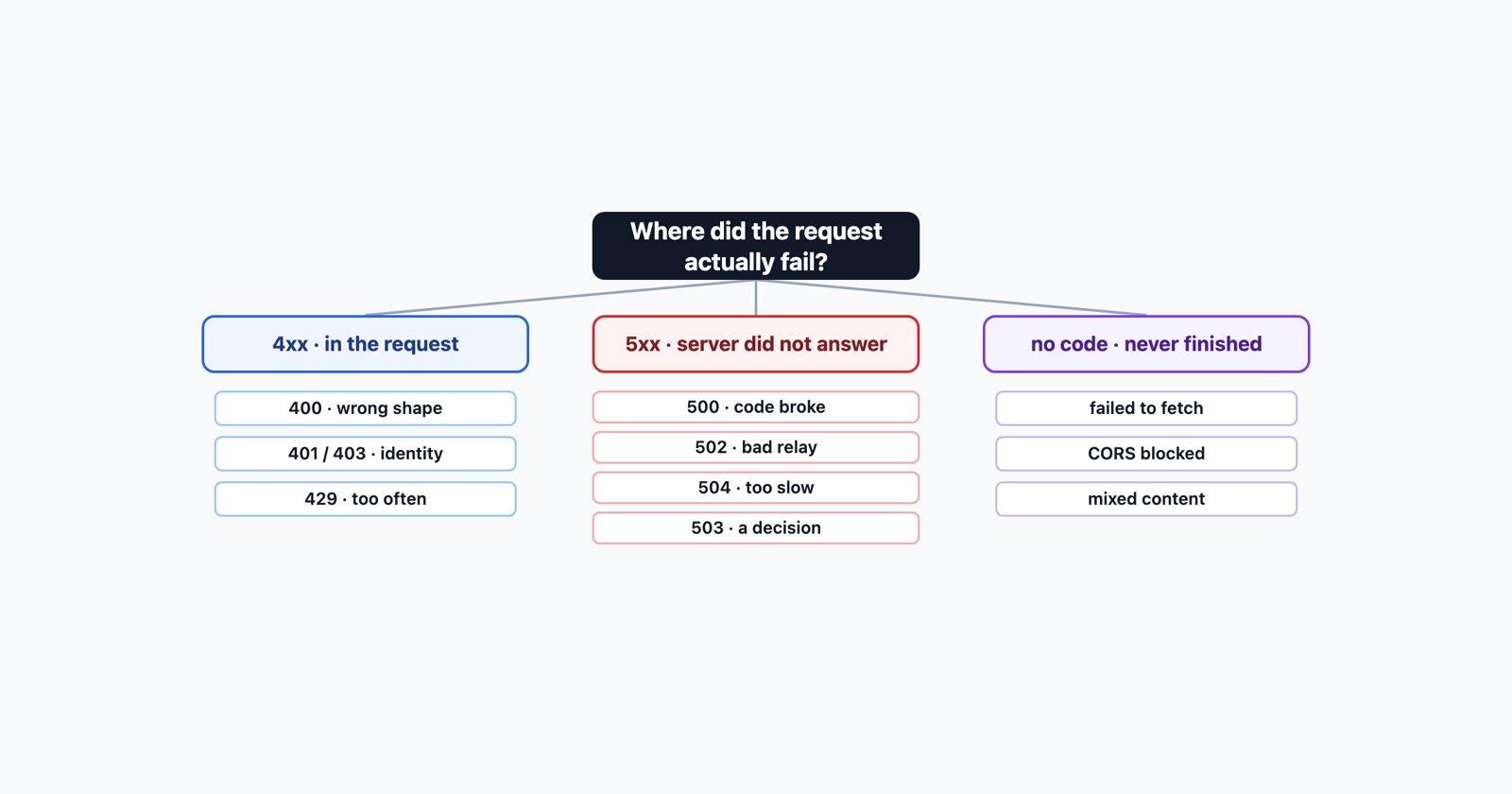
Every HTTP error is a one-line answer to a question nobody asked out loud: what happened to my request? The number is the whole answer, and it is deliberately terse, so most of the work is knowing which question each number is answering.
That is what this page is for. Not a list of all sixty-odd status codes, most of which you will never see, but the dozen or so that actually reach people, arranged by what they tell you about where the failure was.
The one division that matters
The first digit is the only part of the code you need to remember.
- 4xx
- The server understood you and is refusing, or could not parse what arrived. The problem is in the request
- 5xx
- The request was fine. The server failed to produce an answer, or chose not to
Everything else follows from that. A 4xx sends you to look at what was sent: the URL, the headers, the body, the credentials. A 5xx sends you to the server’s logs, and if it is not your server, there is very little you can do beyond reporting it well.
The word “client” in “client error” is where people get lost, so it is worth saying plainly: the client is not you. The client is whatever software composed the request, and on a modern site that is almost always the page’s own JavaScript. A 4xx on somebody else’s site is usually their bug wearing your name.
The 4xx codes you will actually meet
400 Bad Request is the server failing to parse what arrived at all. It is the only one in this family about the shape of the request rather than about permission or existence. A malformed body, a missing content type, an unescaped URL. There is one version you can fix yourself, and only one: a cookie block grown too large, which a private window will confirm in seconds.
401 and 403 are the two that get swapped constantly. 401 means the server does not know who you are and wants credentials. 403 means it knows exactly who you are and the answer is still no. Sending better credentials fixes the first and never fixes the second.
404 Not Found needs no explaining, but one thing about it is worth knowing: a 404 on a request the page made in the background, rather than on the address bar, usually means a build or a deploy dropped a file rather than that anybody typed anything wrong.
429 Too Many Requests is the only status code about your behaviour rather than about the server or the resource. It is also the one error where retrying makes things worse, because a retry is another request for the limiter to count.
The 5xx codes, which look identical and mean different things
All four say “our end”, and telling them apart decides where anybody looks first.
- 500 Internal Server Error
- The application ran and its own code failed. An unhandled exception. It answered, and the answer was an error it made itself
- 502 Bad Gateway
- A front server got an unusable answer from the application behind it. The failure is between two servers
- 503 Service Unavailable
- Something chose not to serve you. Maintenance, capacity, a rate limiter, or nothing healthy to route to
- 504 Gateway Timeout
- The application never answered in time. The front server gave up waiting
The useful shorthand: a
500 is code breaking
while it runs, a 502 is a proxy
that could not get a good answer, a
504 is the application being
too slow, and a
503 is the only one that is
usually deliberate. That last distinction matters more than it sounds: a 503 often carries a
Retry-After header saying exactly when to come back, which almost nobody reads.
The errors that are not status codes at all
Some of the most common failures never produce a status code, which is exactly why they are confusing. The request did not fail; it never completed.
TypeError: Failed to fetch is JavaScript’s least informative error. There is no status to read because the request never got far enough to have one.
CORS errors are the browser refusing to hand your code a response that did arrive. The server answered perfectly well; it just did not say your origin was allowed.
ERR_CONNECTION_REFUSED, RESET, CLOSED and TIMED_OUT happen below HTTP entirely. Each names how far the connection got before it died, which is most of a diagnosis for free.
Mixed content is the browser blocking an insecure resource on a secure page. Nothing failed on the network at all; a rule was applied.
Reading one when it is not yours
If you are a visitor rather than the person who can fix it, three checks separate most cases and take under a minute.
Reload once. A fair number of 500s and 503s are a single bad moment. If it clears, there is nothing to chase.
Try a private window. This is the test for the cookie-and-header family: a 400 that vanishes in private was an oversized cookie block, and one that does not was never yours.
Try another network. A phone on mobile data answers the question a rate limiter raises. If the error follows you everywhere it is your account or the site; if it disappears, it was the address you were coming from. That is the same question as telling your bug from their outage, asked quickly.
Why the code alone is rarely enough to fix anything
Every error above is a summary with the evidence stripped out. That is not an accident: a 500 is vague on purpose, because the stack trace stays on the server, and a 400 will not tell you which header offended it. The code names the category and withholds the case.
So “I got a 500” is a report that tells a developer almost nothing, and by the time anybody investigates, the request that failed is gone. What closes one quickly is the failing request itself, its exact time, and what the person was doing when it happened.
Session Replay
Free Chrome extension. One click on the page that is misbehaving captures the screenshot, the console and the network log, and hands you a link to paste into the ticket.
The network log is where a status code stops being a category and becomes a case: the request that got the error, its headers and body, and the exact minute, so whoever picks it up can line it up against a server log instead of reproducing the whole thing first.
In one paragraph
The first digit is the division that matters: a 4xx means the problem is in the request, a 5xx means the server failed to answer, and the “client” being blamed by a 4xx is usually the site’s own JavaScript rather than you. Inside 4xx, 400 is about the shape of the request, 401 and 403 are about identity against permission, and 429 is about how often you asked. Inside 5xx, 500 is code breaking, 502 is a proxy getting a bad answer, 504 is nothing answering in time, and 503 is the only one that is usually a decision. The errors with no status code at all - failed to fetch, CORS, ERR_CONNECTION_*, mixed content - are the ones that confuse people most, because the request never completed rather than failed. Whichever you have, the code names the category and withholds the case, so capture the failing request while you still have it.