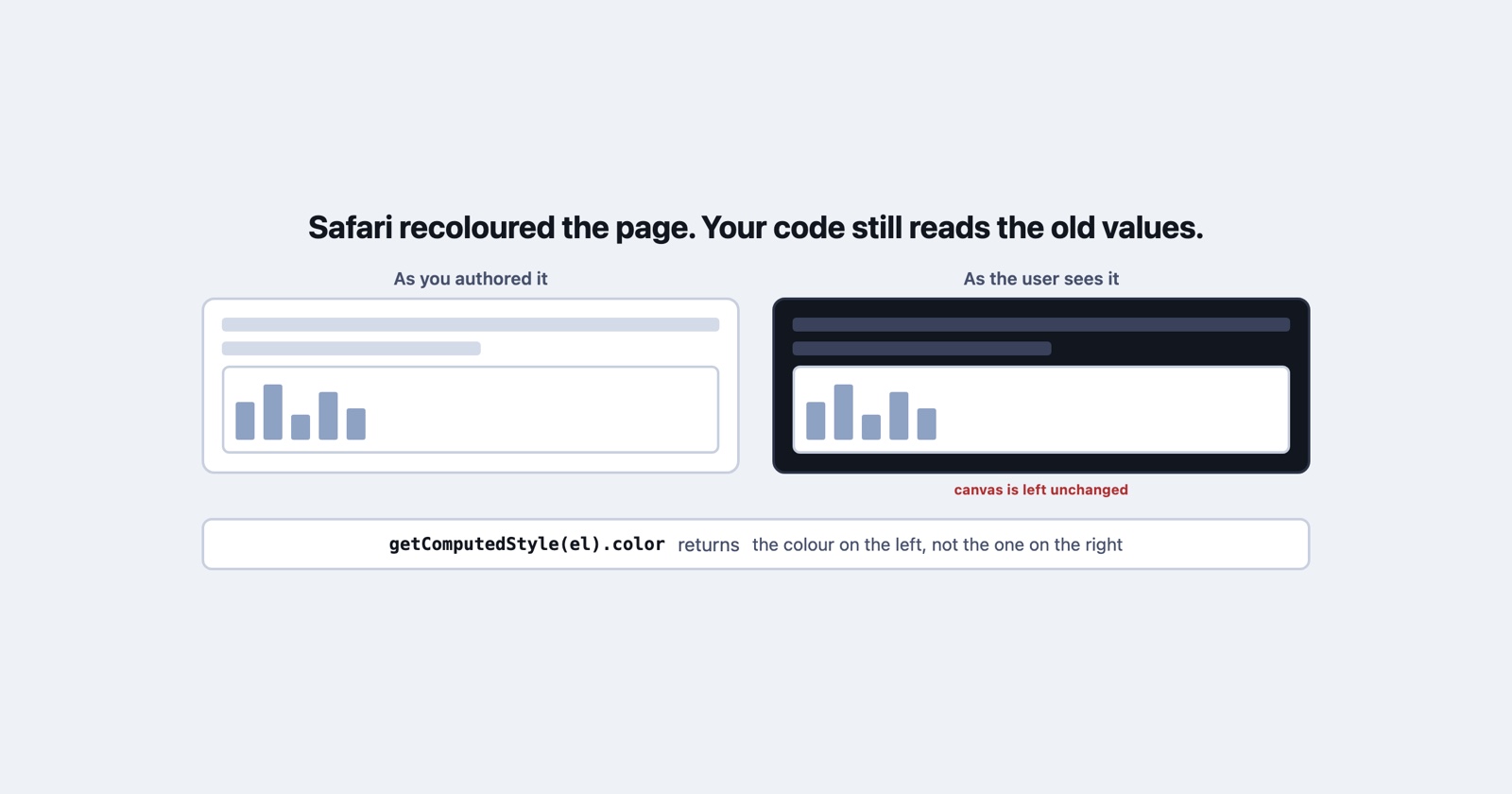
Somebody tells you the colours on your site look wrong. Washed out, or inverted, or the chart in the middle of the page is a bright white rectangle in an otherwise dark layout. You open the same page on the same model of phone and everything is exactly as you designed it.
They are not mistaken and neither are you. Since 3 November 2026 there is a third party in that conversation, and the thing worth knowing about it is not that it changes your colours. It is that your page is deliberately prevented from finding out.
What Adaptive Dark Mode is
Adaptive Dark Mode arrived in the Safari 27.3 beta. WebKit’s own description is one sentence: “When enabled by a user, Safari adapts light websites and presents them as dark.”
The reason they give is a gap between two numbers, and they are worth quoting because they explain why this was always going to happen: “Almost 40% of web page loads are from users in dark mode, and yet only 10% of page loads support it.”
It is opt-in, by the user and not by you. Somebody browsing with a dark system appearance lands on a bright page, Safari offers a preview, and they tap Try. From then on, light pages come out dark for them. There is no banner on the page and nothing in your analytics that says it happened.
How it decides whether to touch your page
There are two paths and only one of them involves you.
If your page declares support for dark mode, nothing happens at all. A page carrying
<meta name="color-scheme" content="light dark"> in its HTML, or color-scheme: light dark in
CSS, is left exactly as written. You have told Safari that you handle dark yourself, and it
believes you.
For everything else, it looks. It analyses the page, estimates whether it is predominantly light or dark, and leaves dark-looking pages alone. A page with a light appearance gets transformed.
The transform itself is a colour matrix that inverts luminosity while preserving hue, so a white background becomes dark and dark text becomes light without everything turning into a photographic negative. For text it aims at the WCAG 4.5:1 contrast ratio.
The part that produces bugs is what it does not transform
A blanket inversion would be easy to reason about. This is not one, and the exceptions are where the reports come from.
- Light CSS gradients are transformed, so a gradient you tuned carefully is recomputed.
- SVG images are inspected and their colours transformed when needed. Bitmap images are mostly left alone, but their pixel histograms are analysed and simple black-and-white logos are inverted.
-
Masks and
mix-blend-modecan be switched off. WebKit’s reasoning is that those effects produce undesirable results on an element whose colours have been transformed, so in some cases Adaptive Dark Mode disables them rather than transforming them. -
<canvas>is left unchanged entirely, because canvas content is, in their words, “hard to predict”.
Read the last two together and you have a defect nobody wrote. A chart rendered into a canvas keeps its white background while every pixel around it goes dark. A composited overlay stops compositing. Both are invisible to you and obvious to the person looking at the screen.
Your page is not allowed to know
This is the part that matters if you are trying to work out what somebody is seeing, and it is a deliberate design decision rather than a gap.
Apple’s position is that a detectable setting is a fingerprinting surface, so:
Safari prevents websites from detecting when Adaptive Dark Mode has been applied. JavaScript that queries CSS colors will get the original authored colors, not the transformed ones.
That is absolute, and the obvious workaround is closed in the same paragraph: “Any images drawn into canvas render in their original form.” Screenshotting your own page into a canvas returns the version you wrote, not the version being displayed.
So getComputedStyle hands you back your own values. A diagnostic endpoint that reports computed
colours reports your stylesheet. A “paste your computed styles” request to the reporter returns
the same. Every instrument you own is on the wrong side of the transform, which is a familiar
shape: the page cannot see itself, and the only witness is a human looking at a screen.
Session Replay
Free Chrome extension. One click on the page that is misbehaving captures the screenshot, the console and the network log, and hands you a link to paste into the ticket.
Opting out, and the catch as of today
Two declarations, doing opposite things.
color-scheme: light dark says you support dark mode and will handle it. Adaptive Dark Mode
then leaves you alone. This is the one to reach for if you have, or intend to build, a real dark
theme, and WebKit’s advice is to declare it in the HTML head rather than injecting it later with
JavaScript, so the page renders correctly as early as possible.
color-scheme: light only, or <meta name="color-scheme" content="light only">, says the
page should only ever be displayed in light mode, and refuses the transform outright.
The catch is worth knowing before you ship it as a fix: WebKit notes that the only keyword
“is not supported in Safari 27.3 beta 1”. It is a beta, the feature is explicitly described as
evolving through that beta, and the documented escape hatch does not work yet in the first
build of it.
What to ask the person who reported it
The ordinary question, “what browser and version”, will not get you there. Somebody who tapped Try several weeks ago does not think of it as a setting they changed, any more than they would report their screen brightness.
Two questions do work. Does it look wrong in a private window? and does it look wrong on a different device? Both change the answer if Adaptive Dark Mode is involved, and neither requires the reporter to know what it is.
Better still is a picture. The gap between what your code describes and what a screen shows is exactly the gap a screenshot closes, and in this case it is the only thing that can, because the page itself has been placed on the wrong side of the question.
This is the second time in a year that a Safari release changed what a bug report means rather than what a page can do, after the reporting changes in Safari 27.
What to take from it
A browser now edits your colours on the user’s behalf, decides case by case which elements to edit, switches off some of your effects to do it, and hides the whole operation from your code for a good reason.
If you have a dark theme, declare it and this never applies to you. If you do not, the realistic
choice is to let it happen and check that your canvases and blend modes survive, or to declare
light only and watch for the beta that supports it. What is not available is finding out from
inside the page, which means the next report of “the colours look wrong” is one you should
believe.
WebKit’s announcement, with the examples and the full list of what is and is not transformed, is Introducing Adaptive Dark Mode.