The report, when it finally arrives, is that the page stopped updating. No error appeared. The numbers simply stopped moving, and a refresh fixed it.
Which is why you rarely hear about it at all. The person who hits this has a working repair in their hands within seconds, so most of them never tell you. The ones who do tell you have nothing to describe except an absence.
A closed socket is not an error
The first thing to unlearn is that this will arrive like a failed request. It will not.
A WebSocket does fire an error event, and MDN describes its type in three words: “A generic
Event.” There is no custom interface under it, which means no code, no reason and no status on
the object you are handed. Nothing throws, so nothing reaches a try/catch. The connection
ends, and the only thing carrying information is the close event that follows.
So the close code is not a detail. It is the entire message.
The codes that mean something
Four are worth knowing by heart, in MDN’s own words.
- 1000, normal closure: “The connection successfully completed the purpose for which it was created.” Nothing to investigate.
- 1001, going away: “The endpoint is going away, either because of a server failure or because the browser is navigating away from the page that opened the connection.”
- 1011, internal error: “The server is terminating the connection because it encountered an unexpected condition that prevented it from fulfilling the request.”
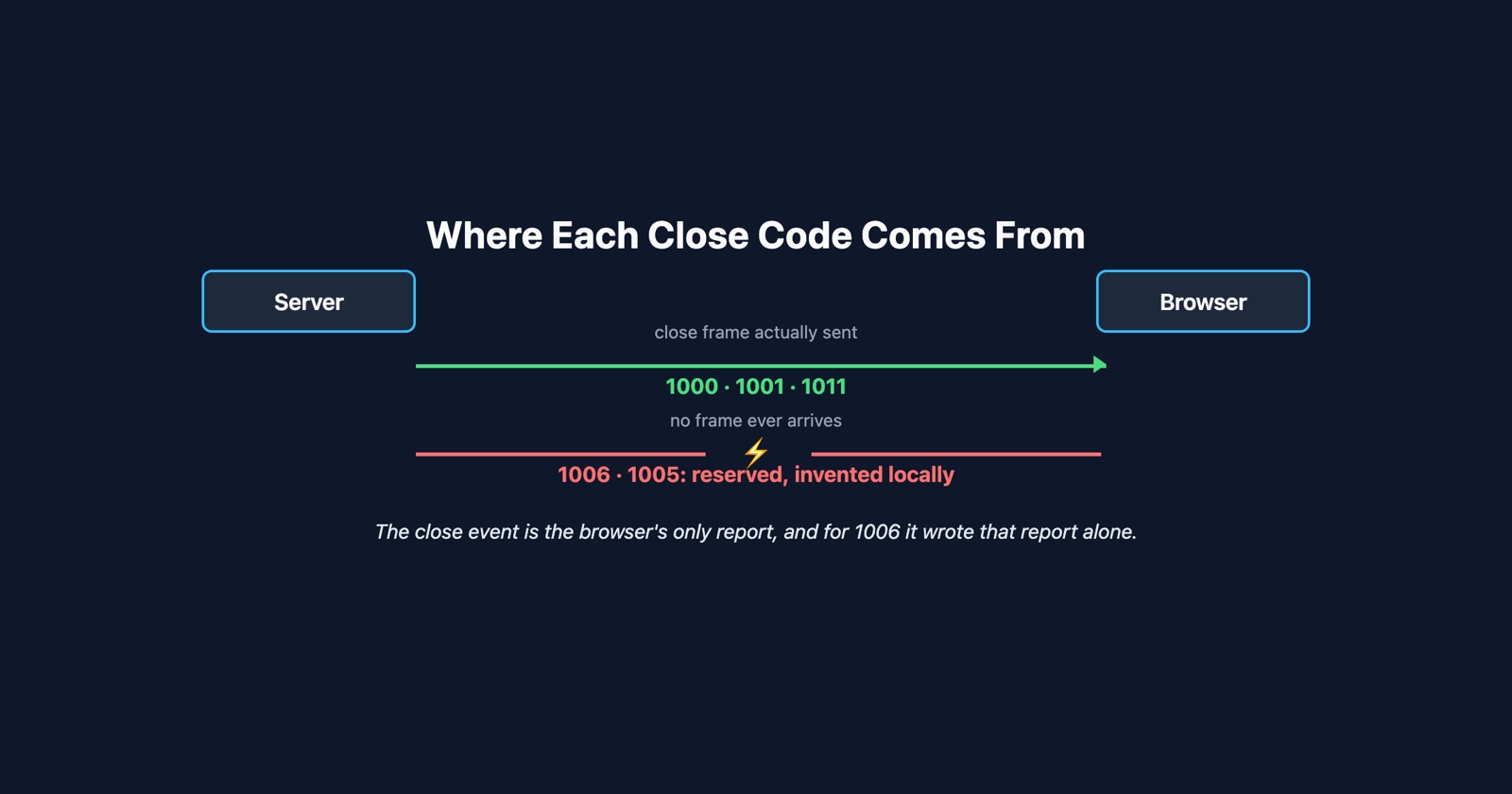
- 1006, abnormal closure, which is the one you will actually see and which the rest of this article is about.
Read 1001 twice, because it covers two unrelated events with one number. A server shutting down and a user clicking a link both produce it. If you are counting 1001s as incidents, you are counting people leaving your site as incidents, and the number will track your traffic rather than your reliability.
1011 is the opposite and it is the one worth alerting on. It is the server admitting the fault in its own words.
The code you see most cannot have come from anybody
Here is the part that is almost never written down, and it changes how you investigate.
RFC 6455 defines 1006 like this:
1006 is a reserved value and MUST NOT be set as a status code in a Close control frame by an endpoint. It is designated for use in applications expecting a status code to indicate that the connection was closed abnormally, e.g., without sending or receiving a Close frame.
1005 carries the same prohibition: “1005 is a reserved value and MUST NOT be set as a status code in a Close control frame by an endpoint.”
So neither of them can be sent. Not by your server, not by the browser, not by anything in between. They are forbidden on the wire. When your handler reads 1006, it is reading a number your own browser invented locally to describe the fact that the connection ended and no close frame ever arrived.
That is a stronger statement than it looks. It means there is no corresponding event anywhere else to go and find.
- What people look for
- A server log line explaining the 1006, on the assumption that the server sent it
- What exists
- Nothing. The code was generated in the browser. The server may not know the connection is gone yet, and whatever killed it is often not the server at all
1006 is therefore not a cause. It is the shape of the evidence: something between the two ends stopped relaying, and neither end got to say goodbye.
Who actually closes a connection nobody closed
Once you accept that the browser is reporting silence, the suspects are the things that sit in the middle and have opinions about idle connections.
A reverse proxy or load balancer with an idle timeout is the common one. Those timeouts are configurable and often short, and a WebSocket carrying nothing between updates looks exactly like an abandoned connection. Corporate network equipment does the same, more aggressively. A phone moving from wifi to mobile data changes the client’s address underneath an open socket, which ends it without ceremony. Laptops suspending do the same.
Note what every one of those has in common: your application code is correct, your server is healthy, and nothing is wrong with the data. The transport went away. That is also why it hits some users constantly and others never, which is the signature that sends a bug report back marked “cannot reproduce”.
The standard defence is a heartbeat: send something small on a timer, more often than the shortest idle timeout between you and your users. It does not fix a dropped connection. It stops an idle one being mistaken for a dead one, which is a different problem that produces the same report.
What to record, because the close event is the only witness
The close event happens once, in the browser, and then the page usually reconnects and the evidence is gone. Four fields are worth capturing at that moment.
socket.addEventListener('close', (event) => {
  report({
    code: event.code,                      // 1006 means nobody sent a code
    wasClean: event.wasClean,              // true if the connection closed cleanly
    reason: event.reason,                  // usually empty, and empty is informative
    secondsSinceLastMessage: (Date.now() - lastMessageAt) / 1000,
    reconnects: reconnectCount
  });
});
wasClean is the cheapest signal of the four: MDN defines it as true “if the connection closed
cleanly”, so a false separates a connection that ended from one that was ended. And
secondsSinceLastMessage is the field that catches an idle timeout, because the interval will
cluster around the same value for every affected user. A cluster at just under sixty seconds is
not a coincidence, it is a configured number somewhere on the path.
Session Replay
Free Chrome extension. One click on the page that is misbehaving captures the screenshot, the console and the network log, and hands you a link to paste into the ticket.
The question to ask the person who reported it
One question, and it is not a technical one: did a refresh fix it?
If it did, the data was never wrong and your rendering was never wrong. A fresh connection was all it took, which points at the transport and away from everything else. That one answer eliminates more than any amount of guessing at their network, and they can give it without knowing what a WebSocket is.
The follow-up worth asking is how long the page had been open. A tab left open over lunch and a tab opened a minute ago are different cases, and the reporter knows the answer.
What to take from it
The failure is quiet by construction. Nothing throws, the error event carries no detail, and
the page keeps rendering the last thing it was told.
The close code is the whole message, and the most common one is a local invention: 1006 is your browser saying that nothing arrived, not your server saying why it left. Codes nobody can send are codes nobody can explain, so stop looking for the server-side half and start looking at what sits between you and the user.
The specification itself is RFC 6455, and the close codes with their one-line meanings are on MDN’s CloseEvent.code page.