Most test case templates are a spreadsheet with fifteen columns: an ID, a module, a priority, the preconditions, the steps, the expected result, then a status, who ran it, when, on what build, and a comments column that fills up with “passed” and “see Slack”.
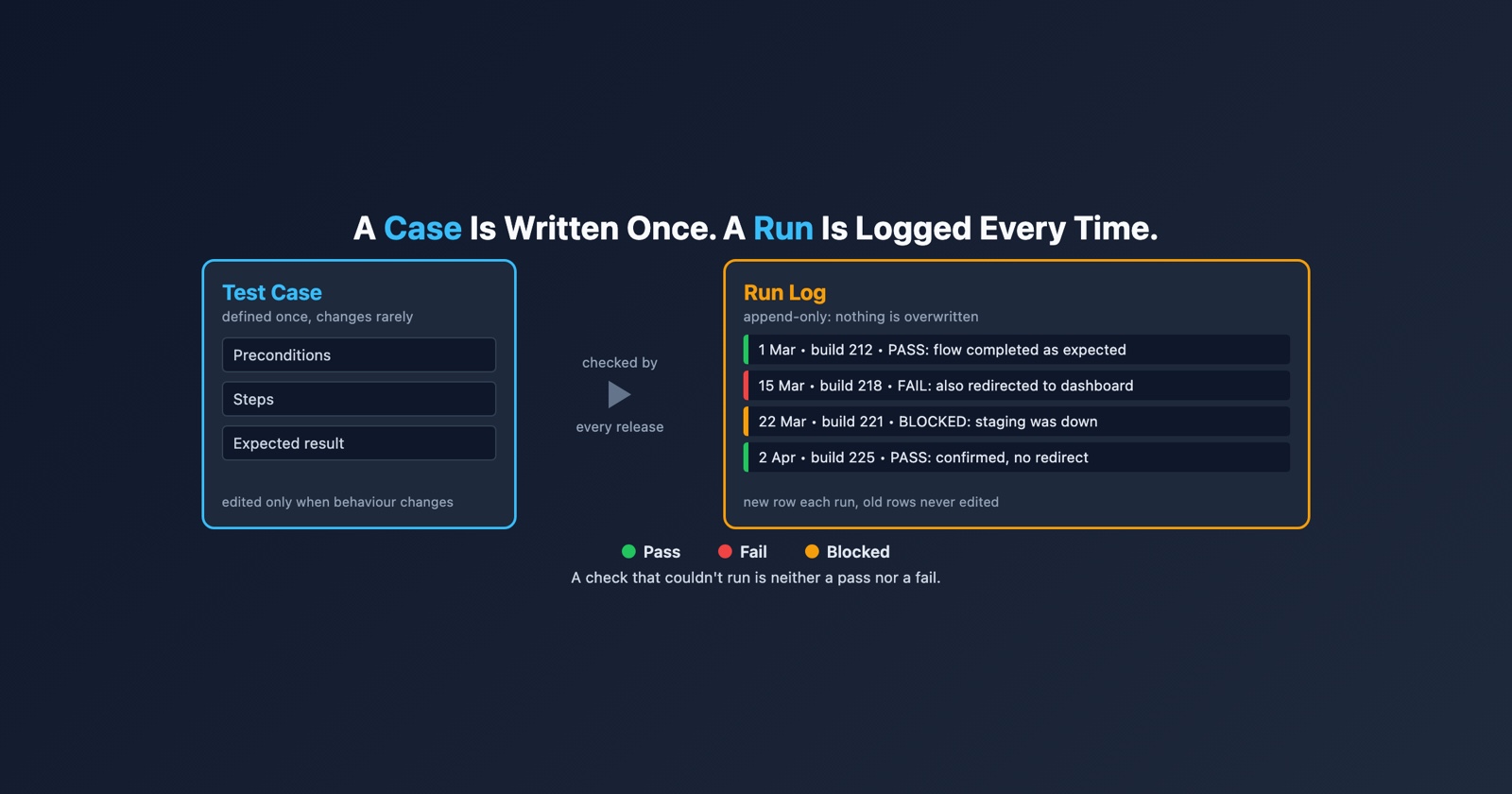
Look at those columns again and they describe two different things. The first half describes a check. The second half describes one time somebody performed it. Putting both on the same row is the reason test case spreadsheets rot, and it is the one thing this template does differently.
The case and the run are different documents
A test case is written once and changes only when the behaviour it checks changes. A run happens every release. One is a definition and the other is a record, and they have different lifespans.
Give the case row a single Status column and every run overwrites the one before. The sheet only ever knows the most recent result. “It passed last release on this build” is gone the moment somebody types “fail” over it, and so is the evidence that would tell you whether the failure is new.
- Weak
- One row per case, with Status, Tested by and Date columns that are overwritten every time the case is run.
- Better
- The case written once, with a run log underneath it that only ever gets a new row added.
The second shape answers the questions people actually ask: when did this last pass, on which build did it start failing, and has it ever been run on Safari at all. The first shape can answer none of them, because every answer was written in the same cell.
The template
Four sections. The first three define the check and change rarely. The fourth is the run log, and it only ever grows.
# Test case: [what is being checked, in one sentence]

**ID:** [TC-number]
**Area:** [feature or screen]
**Last changed:** [date, and what changed in the behaviour]

## Preconditions

The state the world must be in before step 1 makes sense. The case sets
this up itself; it never relies on another test having run first.

- [account, role, or data that must exist]
- [environment, flag or browser, if it matters]

## Steps

One action per step.

1. [action]
2. [action]
3. [action]

## Expected result

Specific enough to be wrong. Say what must NOT happen as well.

- [what the person running it should see]
- [what must not happen: no navigation, no second email, no charge]

## Run log

One row per run. Never edit an old row; add a new one.

| Date | Build | Who | Browser and environment | Result | What was actually seen | Evidence |
| --- | --- | --- | --- | --- | --- | --- |
| [date] | [version] | [name] | [browser, OS, environment] | pass / fail / blocked | [observed, in words] | [link] |
Blocked is not failed
The result column has three values, and the third is the one most templates leave out.
A case is blocked when it could not be run at all: the test account was missing, staging was down, the feature flag was off. Nothing was learned about the behaviour. Record that as a fail and the defect count rises for a reason that has nothing to do with the software, somebody opens a bug nobody can reproduce, and the real question, why the precondition was not met, goes unasked.
Record it as a pass, which happens more often than anybody admits, and a check that never ran is counted as coverage. Of the two lies, that one is worse, because it is the one nobody goes back to correct.
The column that does the work
What was actually seen is the most valuable cell in the run log, and in most spreadsheets it does not exist. There is a Status column instead, and “fail” in a Status column tells the next person almost nothing.
Compare “fail” with “the error message appeared, but the page also navigated to the dashboard and the user was signed in”. The second is half a bug report already. It says what happened, it says how that differs from the expected result written three sections above, and it was written by the one person who saw it, at the one moment they could still describe it accurately.
Write it on passes too, in a few words. A pass that records what was seen can be checked later. A pass that records only “pass” has to be trusted.
What to delete
Most of the columns in the fifteen-column version, because something else already holds them.
Designed by and Date created are in the version history of wherever the case lives. Priority belongs to the area being tested rather than to each case, and on a single case it gets set once and never revisited. Test data belongs inside the preconditions, where it is read as part of the setup rather than in a column beside it. Post-conditions are usually the expected result restated, and when they are not, they are the next case’s preconditions.
What not to delete is the Last changed line. A case whose expected result was quietly edited the day it started failing is the most misleading document in testing, and one line with a date and a reason is what makes that visible.
For what goes in each section and how to write steps somebody else can follow, the guide to writing a test case covers it in detail. When the cases add up to a release, the test plan template is the page that says which of them are in scope.
When a run fails
A failed run is the start of a bug report, and a good run log row has done most of the work: the steps are written, the expected result is written, and what was actually seen is written next to them. What the row cannot hold is the state of the machine it failed on. The browser version, the console, the requests behind the page are exactly what the person fixing it will ask for, and by the time they ask, the tab has been closed.
Session Replay
Free Chrome extension. One click on the page that is misbehaving captures the screenshot, the console and the network log, and hands you a link to paste into the ticket.
That link is what the Evidence column is for. Put it in the row, put the case ID in the bug report, and the two stay joined: whoever fixes it can run the same check, and whoever runs it next release can see that it once failed and why.
The short version
Write the case once and log every run under it, rather than overwriting one status. Give the result three values, because a check that could not run is neither a pass nor a fail. Record what was actually seen, on passes as well as failures. Delete the columns something else already records, and keep the line that says when the expected result last changed.