Trello bug tracking, one card per report, evidence included

Capture the bug once and put it on the board as a card: the page it happened on, the browser, the first console error and one link to the recording, the console output and the network trace, sitting on the list your team already moves cards through.

Install ExtensionSee how it works

5.0 from 17 Chrome Web Store ratings

A card is only as useful as what is written on its back

The front of a bug card is a title. The back is where the evidence should be, and usually is not.

Boards are good at showing where work is. They are poor at holding what a bug looked like when it happened, because a card gets made in a hurry: a title, an attachment if somebody remembered, and a comment saying "see Slack".

The trouble shows up when the card is dragged into Doing. The person who picks it up opens it, finds a title and nothing behind it, and starts a conversation to find out which page, which browser and what the error said.

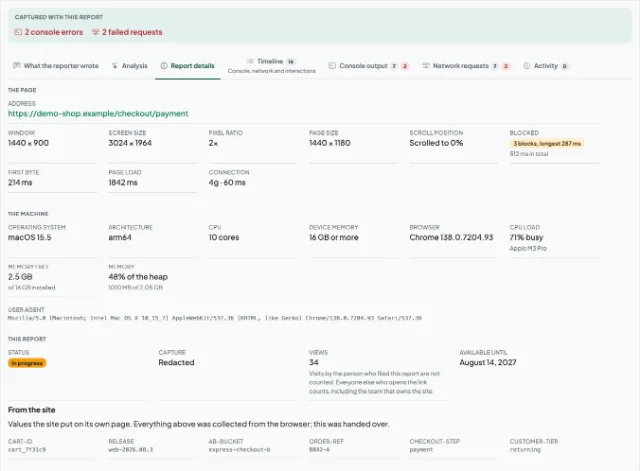
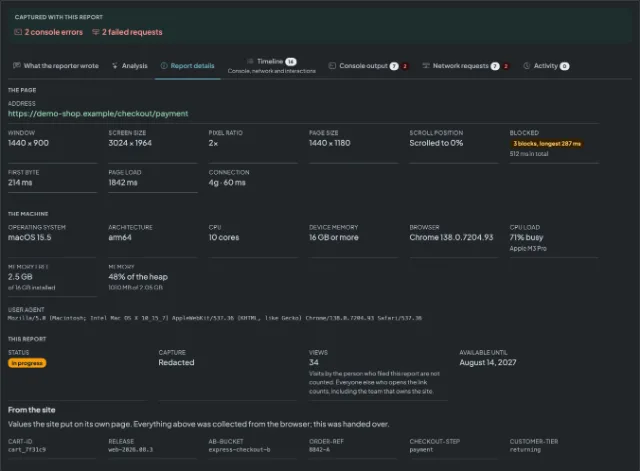
Making the card from the report puts that on the back of it from the start. The description opens with the report link, then the page, the browser and the first console error, so the card that moves across the board carries its own evidence.

A shared report showing the reporter's note, the console output and the browser it was captured inA shared report showing the reporter's note, the console output and the browser it was captured in

Three steps from a bug to a card

Connect Trello and pick the board and list

A team admin approves the connection in Trello, chooses the board and then the list new cards should land on, and binds it to one of your domains or to all of them. What the approval grants is written out on the Trello card on the connectors page.

Capture the bug on the page

Whoever runs into the bug opens the side panel where it happened and records it or takes a screenshot. The browser, the window size, the console output and the network log are captured alongside it.

Press the button and the card is on the list

Anybody looking at the report adds it to the board in one press. The card appears on the list you chose with the report link, the page, the browser and the first console error in its description.

What lands in Trello

The card description the connector writes, as the board receives it.

What arrives
Creates a card on the list you chose, carrying the report and a link to it. Nothing is filed automatically: a card is created only when somebody presses the button on a report.
The first line of every card is the report's link, and that link is public. Anyone who can see the board can open the report without signing in.
What connecting takes
A team admin connects Trello, chooses the board and then the list, and binds it to one of your domains or to all of them. Session Replay never moves, archives or deletes anything already on the board.
On the list
[Open report](https://session-replay.com/replays/8f3c1ab9d24e)

### What the reporter wrote

> The discount code applies but the total does not change.

- Page: https://shop.example.com/checkout
- Browser: Chrome 139
- Operating system: macOS 15.5
- Reported by: Anonymous
- Severity: Major

12 console lines · 34 requests, 1 failed

First error:
```
Uncaught TypeError: discount is null (cart.js:214)
```

Trello is one of several destinations a report can be sent to. What each of the others does with a report, and what connecting it takes, is on the connectors page.

What this does not do

The connector puts a report on the board and stops there. So that you can judge it fairly before approving it:

  • Nothing is filed automatically. A card exists only when somebody presses the button on a report, never because a report arrived.
  • The capture is never in the payload. The recording, the console output and the network log stay behind the link on the card, and the card carries the details rather than attachments.
  • A report's share link is public, and it is the first line of every card. Anyone who can see the board can open the report without signing in, and on a public board that is everybody.
  • Trello's approval screen asks for read and write access: read to list your boards and their lists, write to add the card. Nothing already on the board is moved, archived or deleted.
  • Nothing is read back and nothing syncs. Moving the card to Done does not resolve the report, and comments on the card do not come back.
  • Setup belongs to a team admin, once, for the whole team, and nothing is captured until somebody presses a button.

Questions teams ask before connecting Trello

The report's title becomes the card name, truncated at 250 characters, and the description is written in markdown and capped at 16,384 characters: the report's link on its first line, then what the reporter wrote, the page, the browser and operating system, who filed it and how severe they called it, how many console lines and requests were recorded, and the first console error in a fenced block. The recording and the full logs stay behind that link.

No. A card exists only when somebody looking at a report presses the button on it. The card's link is kept on the report afterwards, so the next person to open it can see it is already on the board, and pressing the button again does not add a second card.

Read and write access. Read is used to list your boards and the lists on them so that you can pick one; write is used to add the card. Nothing already on the board is moved, archived or deleted, and nothing is read back from the board afterwards.

It does not expire on its own: the approval is requested without an end date, so the connection keeps working until somebody withdraws it. The approval itself is revoked in Trello, from the applications list in your account settings; disconnecting on the connectors screen stops cards being added and deletes the stored token on our side. A revoked approval switches the connection off the next time a card is added, and the screen says so.

The first line of every card is the report's link, and that link is public. Anyone who can see the board can open the report without signing in, and on a public board that is everybody. Use a private board if the reports should stay inside the team.

The one chosen at setup, after the board. Every card that connection adds goes there, and moving it on through the board is left to you. The connection is bound to one of your domains or to all of them, so two products can feed two boards.

Put the evidence on the back of the card

Capture the page once, pick the list once, and let every bug card arrive with the recording, the console and the browser behind one link.

Install ExtensionSee pricing

5.0 from 17 Chrome Web Store ratings