GitHub bug tracking with the evidence already on the issue

Today somebody reads a bug report in one window and retypes it into a GitHub issue in another; with this connected, the issue is created from the report itself, carrying the recording, the console errors and the network trace.

The retyping is the part that goes

The bug was already captured. Writing it into the issue a second time is the step nobody needed.

The usual round trip is a person reading a bug report in one window and typing it into a GitHub issue in another. They copy the page address, describe the browser from memory, summarise the error in their own words, and paste a link at the bottom that the engineer has to open before any of it makes sense.

Every hop loses something. The console line gets paraphrased, the window size never makes it across, and the issue that reaches the repository is a description of evidence rather than the evidence itself. The engineer who picks it up asks for the missing half, and the bug waits another day for an answer that already existed.

Filing from the report removes the hop. The issue is created with the report's own details in the body - the link that opens the recording, the page it happened on, the browser it happened in and the first console error - so what lands in the repository is what was captured, not somebody's retelling of it.

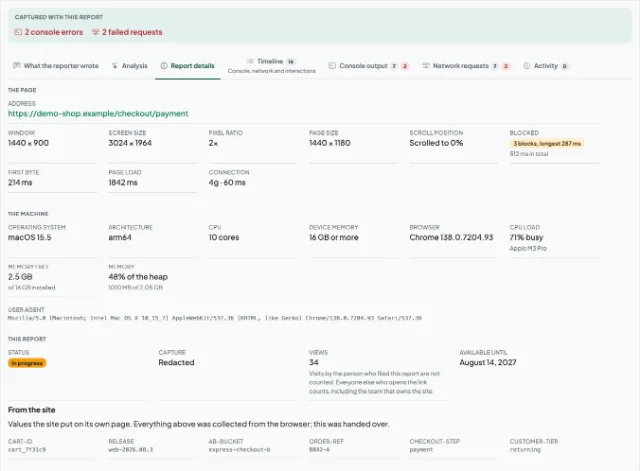
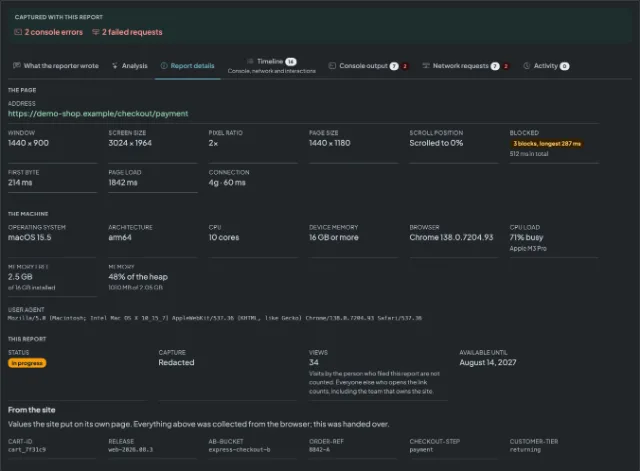
A shared report showing the reporter's note, the console output and the browser it was captured in

Three steps to file into GitHub

Connect the account and pick the repository

A team admin authorises GitHub, chooses the account or organisation and then the repository, and binds it to one of your domains or to all of them. There is nothing to install into the repository itself, and what the connector asks for is written out on the GitHub card on the connectors page.

Capture the bug

Whoever hits the bug opens the side panel on the page that is misbehaving and records or screenshots it. The browser, the window size, the console output and the network log are gathered with it, so nobody has to remember them afterwards.

Press the button and the issue exists

Anybody looking at the report files it in one press, and the issue arrives in the repository with the report link, the page, the browser and the first console error already in the body.

What lands in GitHub

The issue body the connector writes, as the repository receives it.

What arrives
Creates an issue in the repository you chose, carrying the report and a link to it. Nothing is filed automatically: an issue is created only when somebody presses the button on a report.
The first line of every issue is the report's link, and that link is public. Anyone who can read issues in the repository can open the report without signing in, and in a public repository that is everybody.
What connecting takes
A team admin connects GitHub, chooses the account or organisation and then the repository, and binds it to one of your domains or to all of them. Session Replay never edits, closes or deletes anything, and never reads your code.
In the repository
[Open report](https://session-replay.com/replays/8f3c1ab9d24e)

### What the reporter wrote

> The discount code applies but the total does not change.

- Page: https://shop.example.com/checkout
- Browser: Chrome 139
- Operating system: macOS 15.5
- Reported by: Anonymous
- Severity: Major

12 console lines · 34 requests, 1 failed

First error:
```
Uncaught TypeError: discount is null (cart.js:214)
```

GitHub is one of several destinations a report can be sent to. What each of the others does with a report, and what connecting it takes, is on the connectors page.

What this does not do

The connector carries a report outward and stops there. So that you can judge it fairly before wiring it up:

  • Nothing is filed automatically. An issue exists only when somebody presses the button on a report, never because a report arrived.
  • The capture is never in the payload. The screen, the console output and the network log stay behind the link the issue carries, and the issue carries the details rather than the files.
  • A report's share link is public, and it is the first line of every issue. Anyone who can read issues in the repository can open the report without signing in, and in a public repository that is everybody.
  • Nothing is read out of your code, and nothing is edited, closed or deleted. The access the connector holds is used to list the repositories you can write to and to create issues in the one you chose.
  • Nothing is read back and nothing syncs. Closing the issue does not close the report, and comments written on the issue do not come back.
  • No always-on recording, and setup belongs to a team admin, once, for the whole team. Nothing is captured until somebody presses a button.

Questions teams ask before connecting GitHub

The report's title becomes the issue title, truncated at 250 characters, and the body carries the report's link on its first line, then what the reporter wrote, the page it happened on, the browser and operating system, who filed it and how severe they called it, how many console lines and requests were recorded, and the first console error in a fenced block. The recording, the full console output and the network log stay behind that link rather than travelling as attachments.

No. An issue exists only when somebody looking at a report presses the button on it. A report arriving never files anything, so a noisy week on a busy domain does not become a hundred issues nobody triaged.

Repository access, which is used to list the repositories you can write to and to create issues. GitHub offers no narrower grant for creating an issue. Nothing is edited, closed or deleted, and your code is never read.

The first line of every issue is the report's link, and that link is public. Anyone who can read issues in the repository can open the report without signing in, and in a public repository that is everybody. File into a private repository if the reports should not be readable by anyone who finds the issue.

No, in either direction. Closing the issue does not close the report, and comments written on the issue do not come back. The report and the issue are two records that share a link, which is deliberate - there is no background job reconciling them and nothing changes in your repository while you are not looking.

One repository per connection. Every issue that connection files goes there, and you come back to the same setup screen to move it to another one. The connection is bound either to one of your domains or to all of them, so a team running two products can send each one's reports to the repository that owns it.

Stop retyping the bug into the issue

Capture the page once, connect the repository once, and let the issue arrive with the recording, the console and the browser already behind one link.