A client feedback tool for the site you are about to hand over
Your client presses a button on the page they are looking at, draws on what is wrong, and the developer opens a link that already carries the console output, the network log and the browser it happened in.
Why a website feedback tool has to carry the technical half
A client describes what they saw. A developer needs what the browser saw.
A client opens the staging site, finds something wrong, and writes "the button is broken". They are not going to open DevTools, and asking them to would be the wrong thing to ask.
So the agency plays telephone. Which page was it? Which browser? Was it the mobile one? Every question is another email, another day, and a developer who still cannot reproduce it at the end of the round trip.
The round trip is the cost, and it is the part that can be removed without asking the client to learn anything. They press one button and draw on the page; everything a developer would have asked for is collected around that capture.
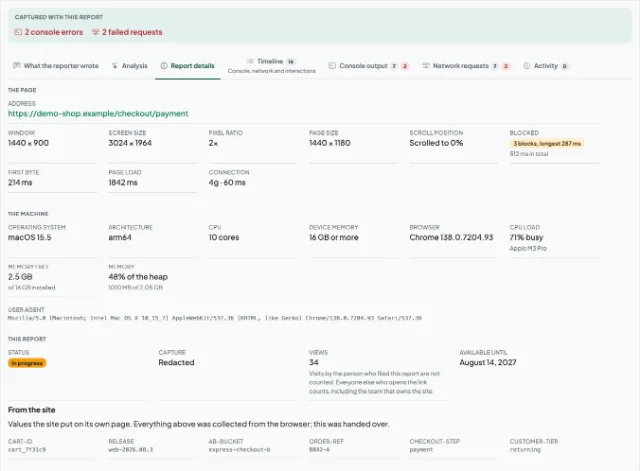
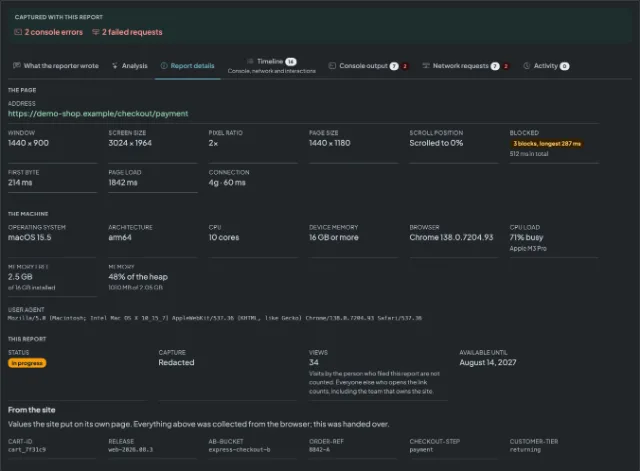
Visual feedback that carries the technical half with it
What arrives with the client's note, without them filling anything in.
Website annotation on the screenshot
The client draws on the captured image to point at the thing that is wrong. The marks are part of what the developer opens, so "this bit here" survives the handover.
Screen recording
When a still is not enough, the client records the tab or an area of the screen while they make it happen again.
Console output
Errors and warnings from the page, stack traces included, so the developer starts at the exception rather than at the description.
Network log and HAR
Every request the page made during a recording, with method, status and timing, and the whole lot downloadable as a HAR file for DevTools.
Environment
Browser and version, operating system, screen and window size. The four questions the first reply to a client email usually asks.
One link, no account at either end
The report opens for anyone who has it. Your client does not sign up, and neither does the contractor you forward it to.
Three steps, client to developer
You add the button
Two lines in the staging site's template put a "report a bug" button on every page of it. Nothing to configure, and it comes off again by deleting the lines.
Your client presses it
They capture the page they are looking at, draw on what is wrong, and write the one thing only they know: what they expected instead.
The report reaches the developer
A link, pasted wherever your team already works. It opens in a browser with the screen, the console and the environment already attached.
Add the button to the site you are handing over
Two lines in the staging site. The script goes in the head, the empty element goes wherever you want the button to sit, and the button that appears is ours - mark, wording, colours and states - so there is nothing to style.
<script src="https://session-replay.com/integration/session-replay-0.4.0.js" defer></script>
<div data-session-replay-button></div>
There is an npm package too, with React, Vue, Svelte and Next.js paths, if a script tag is not how that site is built.
The button opens the Chrome extension, which is what does the capturing. A client who does not have it is offered it by the button itself, and you can install it yourself first to see what they will be shown.
Get your snippet and verification tagWhat this does not do
An agency runs on more than one tool, and this is one narrow part of the handover. So that a comparison is a fair one:
- Your client is not installing nothing. The button opens the Chrome extension, and a client who does not have it is shown an overlay explaining what it is and offering the Chrome Web Store. On Safari or Firefox the overlay says so instead of offering an install that would not work.
- No pinned comments on page elements, and no comment threads on the DOM. Annotation here is drawing on the captured screenshot, not sticky notes anchored to a div that moves when the layout does.
- No always-on recording. Capture is deliberate: a person presses a button, and only then is anything recorded.
- No project board, no task assignment and no kanban. A report is one bug behind one link, and it goes wherever your team already tracks work.
Questions agencies ask
Stop translating what your client saw
Put the button on the staging site once, and every round of feedback arrives with the half a developer cannot get from an email.